
The best Typeform alternatives in 2026 fall into a few clear categories: free, unlimited-response tools like Tally and Youform; animated builders like Visme; and specialist platforms built for one job that Typeform doesn’t do well, such as TIGER FORM’s built-in dynamic QR codes or Feathery’s developer-first embeds.
Typeform is still a strong, design-led form builder, but its free 10-response cap and closed feature push many teams to look elsewhere.
This guide breaks down 10 alternatives, specific Typeform gaps each one closes, best features, pricing, and where each one’s limitations lie.
Key takeaways
- Typeform’s free plan caps out at 10 responses a month, which is the single biggest reason people search for alternatives.
- TIGER FORM – Best for mobile forms
- Tally – Best free alternative
- Fillout – Best for Notion/Airtable-native teams
- Jotform – Best for niche industries
- Youform – Best lightweight alternative
- Visme Forms – Best for animated, interactive forms
- Involve.me – Best for lead generation funnels.
- Feathery – Best for custom onboarding flows
- SurveySparrow – Best for conversational and NPS surveys
A quick look at Typeform alternatives
| Form tool | Best features | Free Plan? | Starting price |
| TIGER FORM | • Native QR code generator • Dynamic QR codes • AI form generator • Quiz form mode • GPS data tracking | ✅ Yes | $16/mo monthly or $14/mo yearly |
| Tally | • Unlimited forms and responses • Conditional logic • Calculated fields • Answer piping • Native Stripe payments | ✅ Yes | $29/mo monthly or $24/mo yearly |
| Fillout | • Unlimited forms and seats • Notion and Airtable sync • Broad field types • Payments • Multi-step logic | ✅ Yes | $19/mo monthly or $15/mo yearly |
| Jotform | • 10,000 pre-built templates • HIPAA-compliant plan tier • Broad payment gateway | ✅ Yes | $39/mo monthly or $34/mo yearly |
| Youform | • Unlimited forms and responses • Core logic • Branding features • Fast form-building workflow | ✅ Yes | $29/mo monthly or $20/mo yearly |
| Visme Forms | • Animated icons and characters • Unified dashboard • Shared brand assets • Broad template library | ✅ Yes | $29/mo monthly or $12.25/mo yearly |
| Involve.me | • Built-in scoring feature • Submission patterns and behavior sorting • Automated email follow-up | ✅ Yes | $49/mo monthly or $29/mo yearly |
| Feathery | • Full logic engine • Built API-first • Document intelligence | ✅ Yes | Book a demo |
| SurveySparrow | • Conversational format • Built-in NPS tracking • 360-degree review • Omnichannel distribution | ✅ Yes | $39/mo monthly or $19/mo yearly |
What is Typeform?
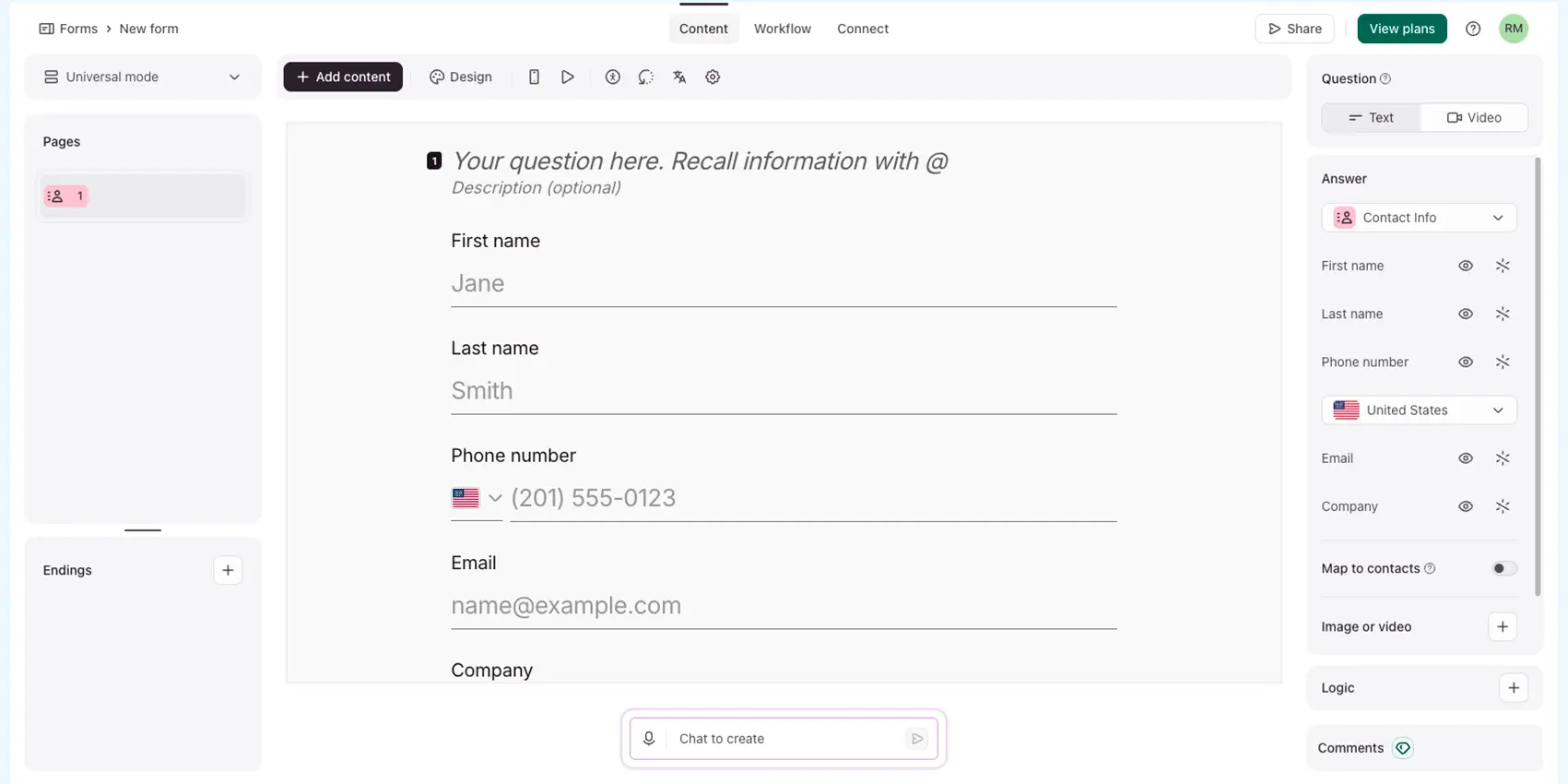
Typeform is a conversational form and survey builder that shows one question at a time in an animated, scrolling interface instead of a single static page of fields.
Its interface walks respondents through the form using a logic jump to skip or personalize later questions based on prior answers. In each question, users can also add images, GIFs, or videos to each screen to keep things visually engaging.
Typeform, based in Barcelona, is popular for having forms that feel less like paperwork or long surveys. It’s a popular pick for market research, quizzes, and lead capture, where finishing the form matters as much as the answers themselves.
Typeform pros:
- An aesthetically polished, intuitive interface that’s easy to both build and fill out
- An interactive, one-question-at-a-time flow that keeps respondents engaged instead of overwhelmed.
- Deep customization of themes, fonts, and colors to match a brand
- Broad integration tools: Google Sheets, Slack, Salesforce, and Zapier
- Logic Jump shows different questions that branch based on the previous answer.
- Its built-in analytics let you track responses and see completion data.
What are Typeform’s limitations?
The Typeform free plan comes with restrictive caps: 10 responses per month, 1 user, and 10 questions per form. Once your one form hits that ceiling, it stops collecting entirely.
Based on recent user reviews on Capterra, Typeform pricing scales quickly once you move past the free plan:
- Basic: $25–29/month for 100 responses
- Plus: $50–59/month for 1,000 responses
- Business: $83–99/month for 10,000 responses
- Enterprise requiring a custom quote.
Beyond Typeform plans, reviewers commonly flag cost as the main practical downside relative to Typeform competitors, and note that logic jump, while powerful, still has to be built manually, question by question, rather than adapting on its own.
Typeform is a solid tool, but for teams with high response volume, tight budgets, or a specific integration need (CRM, QR codes, or Notion database), you can outgrow its plans quickly—a factor to consider.
10 alternatives to Typeform (full breakdown)
1. TIGER FORM – Best for mobile forms
Best features:
- Native QR code generator, no plugins or add-ons
- Dynamic QR codes for reusable forms with no reprints needed
- AI form generator for creating forms from a short prompt
- Quiz form mode for conversational layout
- Submission and scans GPS data tracking by location, device, and time
Typeform has no built-in bridge between a physical touchpoint and a digital form. Anyone collecting data at an event or in person has to paste the form link to a separate QR code generator and hope the destination never needs to change.
TIGER FORM removes those complexities by making the QR code and the form maker the same interface. TIGER FORM is the only builder on this list that links updates, form data, and scan tracking in a single dashboard rather than across two disconnected platforms.
TIGER FORM also recently added two new features: quiz mode and an AI form builder. Quiz mode turns your form into a timed quiz, with automatic scoring and shuffled questions. The AI form generator speeds up form setup with simple prompts.
Tiger Form pricing plans:
| Plan | Billed monthly | Billed yearly (Save 20% with annual billing) |
| Free | Register for the free plan | New users subscribing to annual plans get $15 off + 20% off discount |
| Starter | $16/mo | $14/mo |
| Business | $36/mo | $32/mo |
| Professional | $128/mo | $113/mo |
| Enterprise | Book a demo | |
Limitations: Confirm the current free-tier field and response limits before quoting, and expect a smaller third-party integration catalog than that of an 18-year-old player like Jotform, as well as less brand recognition than Typeform itself.
2. Tally – Best free alternative
Best features:
- Unlimited forms and responses under fair-use guidelines, with no response cap
- Conditional logic, calculated fields, answer piping, and file uploads are included free of charge.
- Native Stripe payments, e-signatures, and password protection, none of it gated.
Typeform’s free plan stops collecting responses once a form reaches 10 submissions per month. Its free plan allows unlimited forms and responses, no monthly limits.
So, a freelancer running several client intake forms at once, or a team collecting ongoing feedback, doesn’t hit a wall the way they would on most free tiers. See the complete breakdown in this Tally Forms guide.
Tally pricing plans:
| Plan | Billed monthly | Billed yearly (2 months off for annual subscriptions) |
| Free | Register for the free plan | |
| Pro | $29/mo | $24/mo |
| Business | $89/mo | $74/mo |
Limitations: Tally’s editor uses text and blocks rather than drag-and-drop. So it looks plainer and less animated than Typeform by default. You’ll need the paid plan to enable custom styling and remove Tally branding.
3. Fillout – Best for Notion/Airtable-native teams
Best features:
- 1,000 responses per month free, with unlimited forms and unlimited seats
- Native two-way sync with Notion and Airtable
- Broad field types, including file uploads, payments, and multi-step logic
Aside from the response cap, Fillout closes an integration gap with Typeform. Typeform’s submissions typically require a connector tool like Zapier to be sent to a database that a team already uses.
Fillout integrates directly (two-way) to Notion and Airtable. Submissions automatically flow into your workspace; no extra tool or subscription needed.
Fillout pricing plans:
| Plan | Billed monthly | Billed yearly (Save 20% with annual billing) |
| Free | Register for the free plan | |
| Starter | $19/mo | $15/mo |
| Pro: | $49/mo | $40/mo |
| Business | $89/mo | $75/mo |
| Team bundle | $300/mo | $250/mo |
| Enterprise | Book a demo | |
Limitations: Its conditional logic isn’t as advanced as Typeform’s for complex, multi-path forms, which sometimes teams switching over need to simplify. The visual design is also more basic and functional, rather than eye-catching.
4. Jotform – Best for niche industries
Best features:
- Over 10,000 pre-built templates for different industries.
- Built-in HIPAA-compliant plan tier for regulated industries
- Broad payment gateway and e-signature support
Typeform lets you start with a blank form. But Jotform helps you start with a pre-made template for your industry or use case need, which matters for teams that need a form built quickly rather than designed from scratch.
It’s also the only tool on this list with a documented path to HIPAA compliance, closing a real gap for regulated industries. Typeform doesn’t serve well out of the box.
Jotform also comes with thousands of form templates for many use cases, so most teams can find a close starting point instead of building from scratch. Know more details about Jotform and its alternatives in our guide.
Jotform pricing plans:
| Plan | Billed monthly | Billed yearly (Save 20% with annual billing) |
| Starter | Register for the free plan | |
| Bronze | $39/mo | $34/mo |
| Silver | $49/mo | $39/mo |
| Gold | $129/mo | $99/mo |
| Enterprise | Custom price | |
Limitations: one user access until the higher enterprise tiers, and the design leans more functional than polished compared to Typeform’s default templates.
5. Youform – Best lightweight alternative
Best features:
- Unlimited forms and unlimited responses, no credit card required to start
- Core logic and branding features are included free, not gated by tier.
- Simple, fast form-building workflow with minimal setup
Youform was created because Typeform locks basic features, like removing its branding and using logic jumps, behind paid plans.
This form tool gives you that same core functionality for free. Paid plans are only for extras like custom domains, not features you actually need to build a form.
Youform pricing plans:
| Plan | Billed monthly | Billed yearly (Save 33% with annual billing) |
| Free | Register for the free plan | |
| Pro | $29/mo | $20/mo |
| Business | $89/mo | $60/mo |
Limitations: A smaller integration catalog than more established competitors, and fewer fine-grained design controls, such as font-size adjustment, on the free tier.
6. Visme Forms – Best for animated, interactive forms
Best features:
- Animated icons and characters for interactive forms
- Forms are stored within the same platform as presentations, infographics, and brand kits.
- Shared brand assets keep a form’s visual identity consistent with everything else a team publishes
- Broad template library across content types, not just forms
This isn’t a response-cap fix; it’s a workflow fix. Typeform is a dedicated form tool with no presentation or infographic capability, and Visme bundles forms into a platform that a design or marketing team is likely already using, so there’s no separate tool to maintain for brand consistency.
Visme Forms pricing plans:
| Plan | Billed monthly | Billed yearly (Save 50% with annual billing) |
| Basic | Register for the free plan | |
| Starter | $29/mo | $12.25/mo |
| Business | $59/mo | $24.75/mo |
| Enterprise | Custom price | |
Limitations: It’s not built specifically as a form tool, so things like logic, integrations, and other form features aren’t as strong as tools made just for that. Pricing per user can be expensive for larger teams, and free exports include a watermark.
7. Involve.me – Best for lead generation funnels
Best features:
- Built-in scoring feature for quizzes and calculators
- Group respondents based on submission patterns and behavior.
- Automated follow-up email sequences triggered by a result or score
Typeform collects answers; it doesn’t score them, segment respondents by outcome, or trigger a follow-up based on how someone answered. Involve.me does all three natively, making it as much a lead-qualification tool as a form tool and closing a gap that Typeform was never built to fill.
Involve.me pricing plans:
| Plan | Billed monthly | Billed yearly (Save 40% with annual billing) |
| Free | Register for the free plan | |
| Start | $49/mo | $29/mo |
| Grow | $99/mo | $69/mo |
| Scale | $199/mo | $139/mo |
| Enterprise | $499/mo | |
Limitations: The starting price is higher than that of other form builders on this list, and it’s unclear whether a free plan is still available. Check involve.me’s site directly before suggesting it to a team on a tight budget.
8. Feathery – Best for custom onboarding flows
Best features:
- Full logic engine included for free
- Built API-first, with a React SDK made for embedding forms into apps
- Document intelligence and e-signatures are included for complex, multi-step applications.
Typeform is a hosted, standalone form; it was never built to live inside another product. Feathery is built for teams embedding complex flows, KYC checks, financial onboarding, and multi-step applications directly into their own app, something Typeform simply can’t do without significant custom work.
Feathery pricing plans:
| Plan | Pricing |
| Free | Register for the free plan |
| Workflows | Book a demo |
| Documents | Book a demo |
| Meetings | Book a demo |
Limitations: It’s not made for non-technical users; you’ll likely need a developer to set it up. It also has fewer integrations with marketing tools like HubSpot or Marketo than form builders designed for marketers, and its paid plans require contacting sales instead of signing up on your own.
9. SurveySparrow – Best for conversational and NPS surveys
Best features:
- The same one-question-at-a-time, conversational format that made Typeform’s UX distinctive
- Built-in NPS tracking and 360-degree review tools
- Omnichannel distribution with dashboards designed for recurring
Typeform is built for one-off forms; SurveySparrow is built around repeat measurement.
A team running a quarterly NPS program or an ongoing customer feedback loop gets dashboards and trend tracking designed for that recurring use case, which Typeform, as a single-form tool, doesn’t offer natively.
SurveySparrow Pricing plans:
| Plan | Quarterly monthly | Billed yearly (Save 40% with annual billing) |
| Free | Register for the free plan | |
| Basic | $39/mo | $19/mo |
| Starter | $59/mo | $39/mo |
| Business | $149/mo | $79/mo |
| Enterprise | Custom price | |
Limitations: the free tier is tight even by this list’s standards, and there’s no self-hosting option, which rules it out for teams in regulated industries that need full data sovereignty.
How did we pick these Typeform alternatives?
Each tool on this list had to clear three checks:
- It needed to close a specific Typeform limitation.
- Publish clear enough pricing to compare fairly against Typeform costs.
- serve a genuinely distinct use case rather than duplicate a tool already on the list.
We favored tools with a genuinely free plan over ones that only offer a trial. We also preferred builders with standout, advanced features like unlimited responses, CRM syncing, QR codes, or developer embeds, over ones that just copy Typeform’s look and feel.
Every pricing figure reflects public pricing pages at the time of research, and SaaS pricing changes often enough that we’d recommend confirming current numbers directly before you buy.
FAQs
What is the best free Typeform alternative?
Tally and Youform are the strongest picks for unlimited free responses, since neither caps the number of submissions a form can collect. TIGER FORM is the next most affordable option, which is priced below $20 per month.
Are there any Typeform options with unlimited responses?
Yes, both Tally and Youform let you make unlimited forms and collect unlimited responses for free (within fair use), and you don’t need a credit card to sign up.
Which Typeform options are best for building quizzes?
Involve.me is built specifically for scoring quizzes and calculators, with native segmentation and automated follow-ups based on a respondent’s result. Jotform is a solid second option for education-focused quizzes with automated grading.
Can I transfer my existing forms from Typeform to another builder?
Most alternatives don’t let you import your Typeform forms in one click, so you’ll likely need to rebuild your form from scratch in the new tool.
Verdict: Which Typeform alternative should you choose?
There’s no “one best” alternative to Typeform, only the one that closes the gap, actually costing you time or money right now.
The right alternative depends on which Typeform limitation matters most for a specific team, not on which tool has the longest feature list. A few questions worth answering before picking one:
Does the data collection start offline? Events, product packaging, or printed materials need a form that connects to a physical touchpoint. TIGER FORM’s native dynamic QR code generation is built specifically for that handoff.
What’s the realistic monthly response volume? If a form regularly gets more than 10 responses a month, Tally or Youform removes that ceiling entirely for free.
Do your submissions need to land somewhere specific? A CRM points toward HubSpot Forms; a Notion or Airtable workspace points toward Fillout.
Are your forms for a solo project or a recurring one? Ongoing NPS or feedback tracking is SurveySparrow’s specific strength; a single campaign form doesn’t need that overhead.
Is compliance a factor? HIPAA-regulated data narrows the field to Jotform’s higher tiers.