

JotForm is a well-known digital form choice, but it isn’t the perfect fit for everyone.
If you’re searching for a JotForm alternative, you’re likely looking for a form builder that better matches your needs, with more affordable pricing, a generous free plan, stronger integrations, AI-powered form creation, or features like QR code sharing.
Fortunately, there are plenty of capable alternatives that offer similar or even better functionality depending on your priorities. Some platforms focus on simplicity, while others excel in automation, customization, collaboration, or industry-specific workflows.
To help you make the right decision, we’ve rounded up the best alternatives for JotForm 2026.
Key takeaways
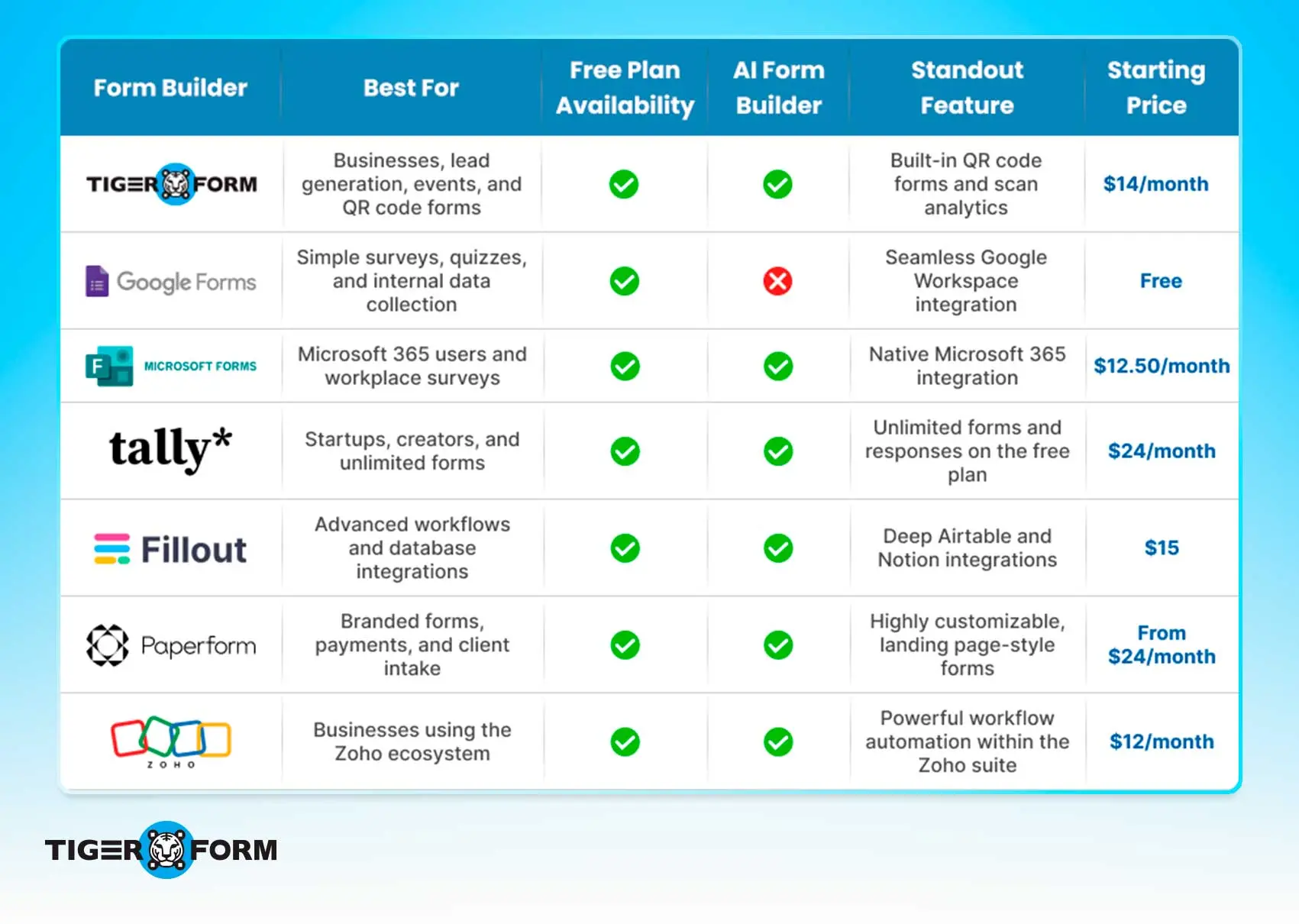
A quick comparison table
TIGER FORM: Best for QR code-based data collection
TIGER FORM is an AI-powered online form builder designed for businesses that want to collect responses both online and offline. Along with an intuitive drag-and-drop builder, it includes built-in QR code generation, customizable templates, workflow automation, and integrations with popular business tools. It’s particularly well-suited for events, retail, healthcare, education, restaurants, and field teams that rely on QR codes to reach respondents quickly.
Where it stands out from JotForm
| Advantage | Why it matters |
| QR codes are built into every form | Every form automatically generates a dynamic QR code, making it easy to share forms on posters, packaging, menus, business cards, or event materials without needing a separate QR code tool. |
| QR code analytics | Besides collecting form responses, you can also track QR code scans, including where, when, and how people access your forms, giving you additional campaign insights. |
| Designed for offline-to-online campaigns | Businesses that collect responses through printed materials or in-person interactions can launch QR-enabled forms much faster because QR sharing is part of the core workflow. |
| Simple form creation with AI | AI helps generate forms from a prompt, reducing the time needed to build forms from scratch. |
| Clean, beginner-friendly interface | The platform focuses on making form creation simple for users who don’t need a large number of advanced configuration options. |
Key highlights
- Built-in dynamic QR codes for every form
- QR scan tracking alongside form analytics
- AI-powered form generation
- Easy drag-and-drop builder
- Ready-made form templates for different industries
- Supports integrations with popular business apps
- Mobile-friendly forms for higher response rates
Google Forms: Best free JotForm alternative for basic Forms
Google Forms is one of the easiest ways to create online forms, surveys, quizzes, and feedback forms. It’s completely free with a Google account and integrates seamlessly with Google Workspace, making it a popular choice for educators, small businesses, and teams already using Google Docs, Sheets, and Drive. While it doesn’t offer the advanced customization or automation found in some dedicated form builders, it’s more than enough for everyday data collection.
Why choose Google Forms over JotForm?
| Advantage | Why it matters |
| Completely free to use | Unlike JotForm’s free plan, Google Forms doesn’t limit the number of forms or responses you can collect, making it ideal for users on a budget. |
| Works smoothly with Google Workspace | Responses are automatically saved in Google Sheets, making it easy to organize, analyze, and share data with your team. |
| Easy to learn | The simple interface lets anyone create and publish a form within minutes, even without prior experience. |
| Real-time collaboration | Multiple team members can build and edit forms together, just like Google Docs. |
| No setup required | If you already have a Google account, you can start creating forms immediately without installing additional software. |
Key highlights
- Completely free with unlimited forms and responses.
- Automatic response collection in Google Sheets.
- Supports quizzes, surveys, registrations, and feedback forms.
- Easy sharing via link, email, or website embed.
- Includes basic conditional logic and file uploads.
- Works across desktop and mobile devices.

Microsoft Forms: Best for Microsoft 365 users
Microsoft Forms is a simple online form builder designed for businesses, schools, and organizations already using Microsoft 365. It lets you create surveys, quizzes, polls, and registration forms with ease while integrating with tools like Excel, Teams, and SharePoint. If your team relies on the Microsoft ecosystem, it’s a convenient alternative to JotForm.
Why choose Microsoft Forms over JotForm?
| Advantage | Why It Matters |
| Works seamlessly with Microsoft 365 | Forms integrate directly with Excel, Teams, Outlook, SharePoint, and other Microsoft apps, making it easy to manage responses without extra setup. |
| Ideal for internal collaboration | Teams can create, share, and review forms together, making it a great option for employee surveys, training quizzes, and internal requests. |
| Built for education and workplaces | Microsoft Forms is widely used for quizzes, assessments, and feedback within schools and organizations. |
| Included with many Microsoft 365 plans | If your organization already subscribes to Microsoft 365, there’s no need to purchase a separate form-building tool for basic use cases. |
| AI-assisted features | Microsoft Copilot can help generate questions and improve forms, helping users create forms more efficiently. |
Key highlights
- Smooth integration with Microsoft 365 applications.
- Easy export of responses to Excel for reporting and analysis.
- Supports quizzes, surveys, polls, and registration forms.
- Real-time collaboration with team members.
- Built-in branching and response tracking.
- Secure and suitable for organizations already using Microsoft’s ecosystem.
Tally: Best for startups and creators
Tally is a modern form builder known for its clean interface and generous free plan. It makes creating forms feel as easy as writing a document, making it a favorite among startups, freelancers, creators, and small businesses. Despite its simple design, Tally includes advanced features like conditional logic, payments, calculations, and AI-powered form creation.
Why choose Tally over JotForm?
| Advantage | Why It Matters |
| Generous free plan | Tally lets you create unlimited forms and collect unlimited responses on its free plan, making it a cost-effective choice for individuals and small teams. |
| Minimal, document-style editor | Instead of a traditional drag-and-drop builder, Tally offers a Notion-like editing experience that’s quick and intuitive. |
| No learning curve | The clean interface makes it easy to build forms without navigating through complex settings or menus. |
| Great for startups and creators | If you’re collecting leads, accepting applications, or running surveys, Tally provides advanced features without overwhelming new users. |
| Built-in payments and calculations | You can create payment forms, donation forms, and order forms without relying on multiple tools. |
Key highlights
- Unlimited forms and responses on the free plan.
- AI-assisted form creation.
- Conditional logic, calculations, and hidden fields.
- Accept payments through Stripe.
- Embed forms or share them with a simple link.
- Integrates with tools like Notion, Airtable, Zapier, and Google Sheets.
Fillout: Best for advanced workflows and database integrations
Fillout is a powerful form builder that goes beyond collecting responses. It integrates seamlessly with platforms like Airtable, Notion, and Google Sheets, making it a great choice for businesses that want to automate workflows and manage data more efficiently. With AI-powered form creation, customizable templates, and a user-friendly interface, Fillout is well-suited for teams that rely on connected workflows.
Why choose Fillout over JotForm?
| Advantage | Why It Matters |
| Deep Airtable and Notion integration | Fillout works closely with Airtable and Notion, allowing you to create forms that read from and write back to your databases in real time. |
| Generous free plan | It offers unlimited forms and users on the free plan, making it a practical option for growing teams and businesses. |
| Portal and workflow support | Beyond forms, you can build customer portals and approval workflows using the data you collect. |
| Easy database updates | Respondents can update existing records instead of creating duplicate entries, which is useful for applications, directories, and customer portals. |
| Designed for workflow automation | Fillout makes it easy to connect forms with business processes, helping teams reduce manual work. |
Key highlights
- AI-powered form creation.
- Unlimited forms and users on the free plan.
- Native integrations with Airtable, Notion, and Google Sheets.
- Customer portals and record update forms.
- Conditional logic, calculations, and file uploads.
- Integrates with Zapier, Slack, Stripe, and other popular apps.
Paperform: Best for branded forms and payment collection
Paperform combines form building with the flexibility of a landing page builder. Instead of creating traditional forms, you can design visually appealing pages that match your brand while collecting payments, bookings, applications, and customer information. Its highly customizable editor makes it a popular choice for businesses that want their forms to look as polished as their website.
Why choose Paperform over JotForm?
| Advantage | Why It Matters |
| More design flexibility | Paperform lets you create forms that feel like branded landing pages, giving you greater control over layouts, fonts, images, and overall appearance. |
| Ideal for selling online | It includes built-in payment collection, product listings, subscriptions, and appointment bookings, making it well-suited for businesses that sell products or services. |
| Rich content support | Add images, videos, text blocks, and other content throughout your form to create a more engaging experience. |
| Easy customization | Customize forms without coding to match your website and brand identity. |
| Built for client-facing forms | If you’re collecting orders, bookings, or applications, Paperform focuses on creating a polished experience for respondents. |
Key highlights
- Highly customizable, landing page-style forms.
- Built-in payment processing and appointment booking.
- Supports subscriptions, product sales, and donations.
- Rich media support, including images and videos.
- Conditional logic and workflow automation.
- Integrates with popular business tools like Stripe, Zapier, Slack, and Google Sheets.
Zoho Forms: Best for businesses using the Zoho ecosystem
Zoho Forms is a versatile online form builder that fits naturally into the Zoho suite of business applications. Whether you’re collecting leads, customer feedback, employee requests, or event registrations, it helps automate data collection and connects seamlessly with other Zoho products. It’s a strong choice for businesses that already use Zoho CRM, Zoho Desk, or Zoho Campaigns.
Why choose Zoho Forms over JotForm?
| Advantage | Why It Matters |
| Built for the Zoho ecosystem | Form responses can flow directly into apps like Zoho CRM, Zoho Desk, Zoho Campaigns, and Zoho Creator without relying on third-party connectors. |
| Powerful workflow automation | Automate notifications, approvals, and follow-up actions using Zoho’s built-in workflow tools. |
| Works well for field teams | Mobile apps with offline form submission make it easy to collect data even without an internet connection. |
| Business-ready features | Supports approval workflows, task assignments, and team collaboration for day-to-day business operations. |
| Flexible deployment options | Share forms through links, embed them on websites, or publish them across multiple channels. |
Key highlights
- Smooth integration with the Zoho suite.
- Mobile app with offline data collection.
- Workflow automation and approval processes.
- Drag-and-drop form builder with customizable templates.
- Payment collection and file uploads.
- Integrates with third-party tools through Zapier and other connectors.
Key takeaways
- TIGER FORM is the best choice if you want built-in QR code forms, AI-powered form creation, and an easy way to collect responses both online and offline.
- Google Forms is ideal for individuals and teams looking for a completely free solution for basic forms, surveys, and quizzes.
- Microsoft Forms works best for organizations already using Microsoft 365 and needing seamless integration with their existing tools.
- Tally is a great option for startups, freelancers, and creators as it has a generous free plan and a simple, document-style editor.
- Fillout is perfect for businesses that rely on Airtable, Notion, or other databases and want to automate workflows.
- Paperform stands out for businesses that want beautifully designed forms, online payments, and a branded customer experience.
- Zoho Forms is the best fit for businesses already using the Zoho ecosystem and looking to automate data collection across their apps.
Why look for a JotForm alternative?
JotForm is one of the most popular online form builders, offering an easy-to-use drag-and-drop editor, hundreds of templates, and plenty of integrations. It works well for creating contact forms, surveys, registrations, payment forms, and more.
However, as your business grows, your needs may change. You might need higher submission limits, more affordable pricing, better workflow automation, stronger collaboration features, or native integrations with the tools you already use. Some users also look for features like AI-powered form creation, built-in QR code sharing, or more flexibility for complex workflows.
Pricing can add up
While JotForm offers a free plan, businesses with growing form submissions often need to upgrade to higher-tier plans. If your needs fall between pricing tiers, you may end up paying for features or capacity you don’t fully use.
Submission limits can be restrictive
JotForm places monthly limits on submissions and forms views based on your plan. If you exceed those limits, your forms may stop accepting responses until your plan resets or you upgrade, which can be frustrating during busy campaigns or events.
Some advanced features cost more
Many powerful features are available only on higher-tier plans, and some workflows require additional third-party tools. This can increase your overall costs as your business scales.
Automation and integrations vary
Although JotForm supports many integrations, some rely on third-party automation platforms instead of direct connections. If you depend on automated workflows, it’s worth checking how your essential apps integrate.
Every business has different needs
The best form builder depends on your budget, workflow, and required features. Some businesses prioritize affordability, while others need AI, form sharing with QR codes, advanced security, or better collaboration tools.
How to choose the right JotForm alternative
Not every form builder is the right fit for every business. Before making the switch from JotForm, think about how you’ll use the platform today and whether it can support your needs as they grow. Here are the key factors to consider.
Budget
Start by deciding how much you’re willing to spend. While many online form generators offer free plans, they often come with limits on submissions, storage, or features. Compare paid plans carefully to ensure you’re getting the features you need without paying for extras you won’t use.
Form limits
Check for restrictions on the number of forms, monthly submissions, file storage, and users. If you expect high response volumes or manage multiple forms, choose a platform that can handle your workload without frequent plan upgrades.
AI capabilities
Many modern form builders now include AI to speed up form creation. If you regularly build forms from scratch, look for a platform that can generate forms, suggest questions, or automate repetitive tasks using AI.
Templates
A large template library can save time and help you launch forms faster. If you need event registrations, customer feedback, job applications, or healthcare forms, ready-made templates reduce manual work.
Automation
Forms should do more than collect data. Look for features like automated notifications, approval workflows, follow-up emails, and task creation to reduce manual work and improve efficiency.
Integrations
Your form builder should work well with the tools you already use. Check for integrations with CRMs, email marketing platforms, project management software, cloud storage, and communication tools to keep your workflows connected.
Analytics
Built-in analytics can help you measure form performance. Depending on your needs, look for insights such as submission trends, completion rates, response summaries, or QR code scan analytics to make data-driven decisions.
Security
If you collect sensitive information, security should be a priority. Look for features such as data encryption, role-based access, and compliance with standards like GDPR, HIPAA, or SOC 2, depending on your industry.
Scalability
Choose a platform that can grow with your business. As your team, response volume, or workflows expand, your form creator should offer flexible plans and advanced features without requiring you to switch platforms later.
Mobile support
Most respondents complete forms on their phones. Make sure the platform creates mobile-friendly forms that load quickly and provide a smooth experience across smartphones, tablets, and desktops.
How to migrate from JotForm
Switching from JotForm doesn’t have to be complicated. With a little planning, you can move to a new form builder without disrupting your workflows or losing valuable data.
1. Export your existing forms and responses
Before making any changes, back up your forms and download all existing submissions. This ensures you have a copy of your data if you need to refer to it later.
2. Choose the right replacement
Pick a form builder that matches your needs. Consider factors like pricing, submission limits, AI features, templates, integrations, security, and automation to find the best fit for your business.
3. Recreate or import your forms
Use your new platform’s templates, AI tools, or import options to rebuild your forms. Double-check field types, conditional logic, branding, and confirmation messages to make sure everything works as expected.
4. Test your workflows
Submit a few test responses to verify that notifications, approvals, payments, file uploads, and automations are working correctly before going live.
5. Reconnect your integrations
If your forms connect to tools like Google Sheets, CRMs, email marketing platforms, or project management software, update those integrations so data continues to flow to the right places.
6. Update your form links
Replace old JotForm links and embedded forms on your website, landing pages, emails, social media, and printed materials with your new form links or QR codes.
7. Monitor new submissions
After launching, keep an eye on incoming responses for a few days. This helps you catch any issues early and ensures your new forms are collecting data as expected.
Tip: Don’t delete your JotForm account immediately. Keep it active until you’ve confirmed that all forms, integrations, and workflows have been successfully migrated and your new platform is running smoothly.

Final Thoughts: Which JotForm alternative is right for you?
JotForm remains one of the most popular online form builders, but it isn’t the perfect fit for everyone. The right JotForm alternative depends on your budget, workflow, and the features you need most.
If you’re looking for AI-powered form creation with built-in QR code sharing and analytics, TIGER FORM is a great choice. If a free solution is your priority, Google Forms and Tally are excellent options. Businesses already using Microsoft 365 or the Zoho ecosystem will benefit from their native integrations, while Fillout is ideal for database-driven workflows, and Paperform stands out for beautifully branded forms and online payments.
Before making the switch, compare each platform’s features, integrations, automation capabilities, and pricing to ensure it meets your current needs and can grow with your business.
The best JotForm alternative isn’t necessarily the one with the most features, it’s the one that helps you create forms, collect data, and automate your workflows more efficiently.
FAQs
Which JotForm alternative is best for businesses?
If your business needs AI-powered forms with built-in QR codes, TIGER FORM is a great choice. For Microsoft 365 users, Microsoft Forms is a natural fit, while Zoho Forms works best for businesses already using the Zoho ecosystem.
Which JotForm alternative is best for collecting payments?
Paperform is a strong option for payment forms, subscriptions, bookings, and online sales thanks to its flexible payment features and customizable form design.
Is there a free alternative to JotForm?
Yes. Google Forms, Tally, Microsoft Forms, Fillout, Zoho Forms, and TIGER FORM all offer free plans, although the available features and usage limits vary by platform.
What should I look for in a JotForm alternative?
Compare pricing, submission limits, templates, AI capabilities, integrations, automation, security, analytics, mobile support, and scalability. The best platform is the one that fits your workflow today and can grow with your business.