Your form is a part of your brand, too. If your website, emails, and other customer touchpoints have a clear brand style, but your forms look generic, they can feel like they don’t really belong to your business. Online form generators make it easier to create forms that match your brand’s look and fit your specific needs, and create different forms for different purposes.
But not every online form generator offers the same features or level of customization. We’ve rounded up the six best form creators, what they offer, and which one could be the right fit for your needs.
Key takeaways
- An online form generator helps you create forms that match your brand’s look instead of settling for generic, one-size-fits-all layouts.
- The article compares six form generators, TIGER FORM, Canva Forms, Visme Forms, Formaloo, involve.me, and SurveySparrow, by use case, standout feature, customization options, and pricing.
- Brand-friendly features to look for include custom colors and fonts, logo placement, flexible layouts, reusable themes, mobile-responsive design, custom domains, removable platform branding, and custom CSS.
- You can build a branded form in a few steps with TIGER FORM: start from a template, a blank form, or AI, then add fields, customize the design, set up conditional logic, and preview before publishing.
- Customizable dynamic QR codes let you share your finished form across websites, emails, print materials, and events.
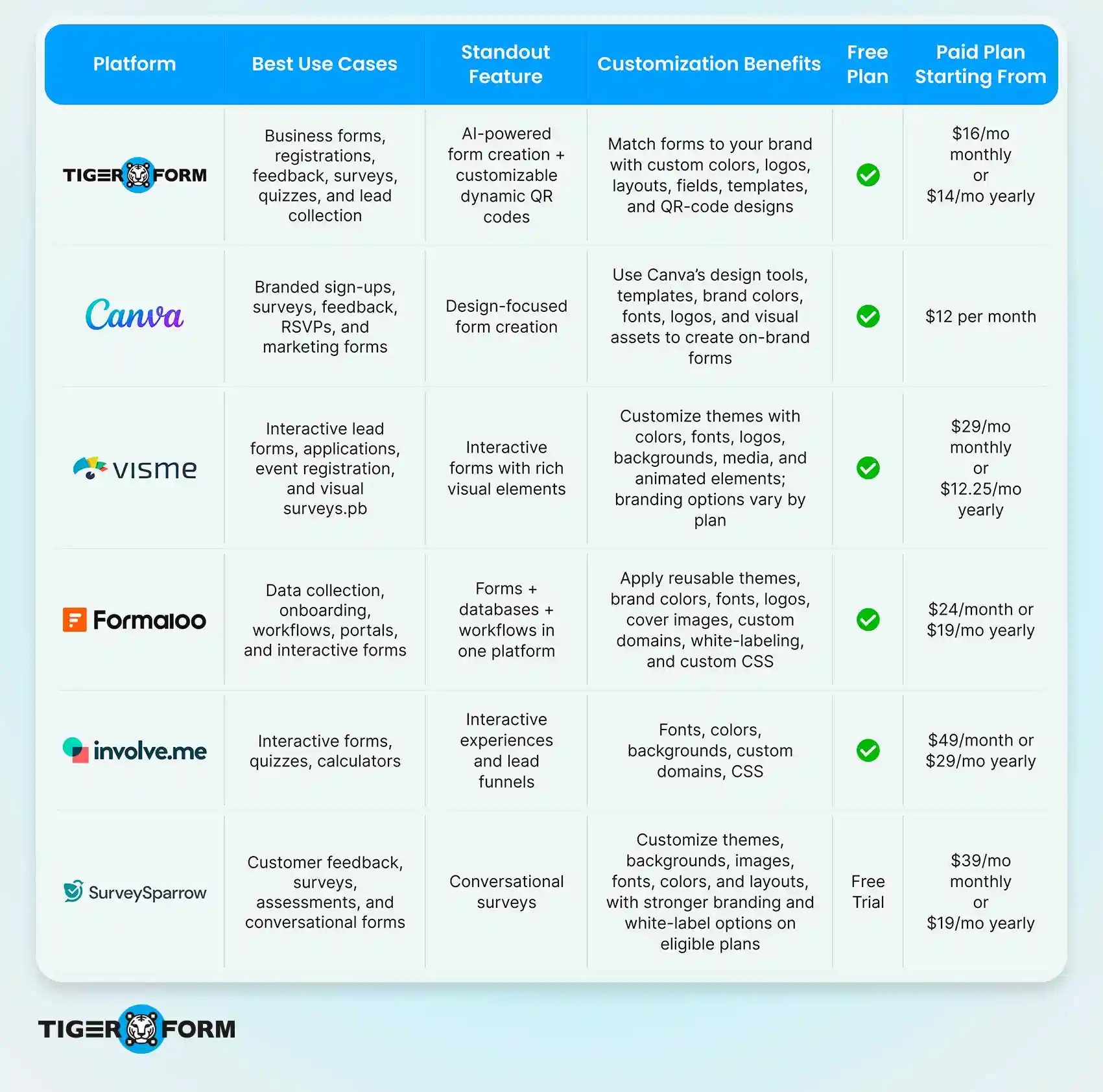
TL;DR: A quick look at the best online form generators
6 best platforms for creating custom forms
1. TIGER FORM
TIGER FORM is an AI-powered online form generator for creating forms for registrations, surveys, feedback, lead collection, quizzes, and more. You can start with a template, build a form from scratch, or use AI to generate a form based on your requirements.
It also combines form creation with a built-in QR code generator. You can customize your forms with your branding and create dynamic QR codes for sharing them across print and digital channels. Features such as conditional logic, analytics, notifications, integrations, and data exports make it suitable for a range of business use cases.
Key features
- AI form creation: Generate a form draft from a simple prompt.
- Form customization: Add branding, customize layouts, and choose the fields you need.
- Dynamic QR codes: Create and customize QR codes to share your forms.
- Analytics: Track form views, submissions, and other performance data.
- Integrations: Connect your forms with other business tools.
- Templates: Start with ready-made forms for different use cases.
- Branding customization: custom domains, logo and themes for higher plans
| Plan | Monthly billing | Annual billing |
| Freemium | $0/month | $0/month |
| Starter | $16/month | $14/month |
| Business | $36/month | $32/month |
| Professional | $128/month | $113/month |
| Enterprise | Custom pricing | Custom pricing |
2. Canva Forms
Canva Forms lets you create forms directly within Canva and add them to your designs. You can use ready-made form templates, customize the questions, rearrange them, and adjust the text to fit your needs. This makes it useful for creating branded sign-up forms, surveys, feedback forms, and RSVPs while keeping them consistent with your other Canva designs.
Key features
- Form templates: Start with ready-made form designs and customize them.
- Design customization: Adjust text, layouts, colors, fonts, and other visual elements.
- Branding: Use Canva’s Brand Kit to keep brand colors, fonts, and other assets consistent.
- Visual content: Add Canva’s design elements to create more visually engaging forms.
- Drag-and-drop editor: Easily arrange and edit form elements within your design.
- Sharing: Save and share your finished form through Canva.
| Plan | Monthly billing | Yearly billing |
| Free | $0/month | $0/month |
| Pro | $12/month | $144/year |
| Business | $20.83/person/month | $250/year |
| Enterprise | Custom pricing | Custom pricing |
3. Visme Forms
Visme Forms is part of Visme’s visual content platform and lets you create interactive forms for lead generation, surveys, applications, event registration, and other data-collection needs. Its visual editor lets you build forms that fit your brand, rather than relying on a basic form layout.
You can customize forms with your own brand colors, fonts, templates, and other visual elements. Visme’s higher plans also include Brand Kit features, analytics, integrations, and additional branding controls.
Key features
- Visual form design: Create forms using Visme’s drag-and-drop editor.
- Brand customization: Use your own fonts, colors, brand templates, and other visual elements.
- Interactive elements: Add visual and interactive content to make forms more engaging.
- Templates: Start with ready-made templates and customize them for your needs.
- Analytics: Track engagement and form performance on eligible plans.
- Integrations: Connect forms with supported third-party tools.
- Lead collection: Collect and store leads through your forms.
| Plan | Monthly billing | Annual billing |
| Basic | $0/month | $0/mo billed yearly |
| Starter | $29/month | $12.25/mo billed yearly |
| Pro | $59/month | $24.75/mo billed yearly |
| Enterprise | Custom pricing | Custom pricing |
4. Formaloo
Formaloo is one of the best choices for creating forms, surveys, apps, portals, and dashboards. It gives you more control over how your forms look and work, making it useful for businesses that need branded forms along with workflows and data management.
You can customize forms with your logo, colors, themes, custom CSS, and domains. Paid plans can also remove Formaloo branding, so the finished form can fit more closely with your brand.
Key features
- Form customization: Adjust colors, layouts, buttons, and other design elements.
- Branding: Add your logo and create forms that match your brand.
- Custom domains: Publish forms and portals on your own domain.
- Custom CSS: Add more control over your forms’ appearance.
- White-labeling: Remove Formaloo branding from paid plans.
- Workflows: Build automated processes around form submissions.
- Apps and portals: Turn collected data into custom apps, dashboards, and client portals.
| Plan | Monthly billing | Annual billing |
| Free | $0/month | $0/month |
| Pro | $24/month | $19/month |
| Business | $48/month | $38/month |
| Enterprise | Custom pricing | Custom pricing |

5. involve.me
involve.me is an interactive form and funnel builder for creating forms, surveys, quizzes, calculators, and lead-generation experiences. It gives you more flexibility than a basic form builder, especially if you want forms to feel like part of your website or marketing campaigns.
Its visual editor lets you customize fonts, colors, backgrounds, layouts, and other design elements. You can also use your own domain and remove involve.me branding on eligible paid plans, while higher plans add custom CSS for deeper design control.
Key features
- Interactive forms: Create quizzes, calculators, assessments, surveys, and lead funnels alongside standard forms.
- Visual customization: Control fonts, colors, backgrounds, borders, and other design elements.
- Custom domains: Publish forms and funnels on your own domain on eligible plans.
- Lead scoring: Assign scores to responses and use them to qualify and segment leads.
- AI funnel builder: Generate forms, quizzes, calculators, and other interactive experiences with AI.
- Custom CSS: Get deeper control over the design on higher-tier plans.
| Plan | Monthly billing | Annual billing |
| Free | $0/month | $0/year |
| Start | $49/month | $29/month |
| Grow | $99/month | $69/month |
| Scale | $199/month | $139/month |
| Enterprise | From $499/month | From $499/month |
6. SurveySparrow
SurveySparrow is a survey and feedback platform built around conversational surveys and customer feedback. It can be used for customer surveys, employee feedback, assessments, and other response-collection use cases.
For customization, SurveySparrow offers themes, background images, fonts, colors, and other visual controls. Its Business plan adds custom branding, while Enterprise includes deeper customization, such as CSS.
Key features
- Conversational surveys: Present questions in a more interactive, chat-like format.
- Custom branding: Add your own branding to the Business plan.
- Survey themes: Customize the visual appearance of your surveys.
- Multichannel sharing: Distribute surveys via email, SMS, web, and QR codes.
- Logic: Use display and skip logic to show relevant questions.
- AI survey creation: Create surveys with AI based on a prompt.
- Advanced customization: Enterprise plans support CSS customization.
| Plan | Monthly billing | Annual billing |
| Free | $0/month | $0/month |
| Basic | $39/month | $19/month |
| Starter | $59/month | $39/month |
| Business | $149/month | $79/month |
| Enterprise | Custom pricing | Custom pricing |
Note: Prices may vary by location, billing cycle, and promotional offers.
Form creator features that make forms more brand-friendly
Keeping your forms consistent with your brand can make the overall experience feel more polished and familiar. A form creator with the right customization options makes it easier to carry your brand style into every form you create. Here are some key features to look for:
Custom colors and fonts
Your form’s colors and typography should match the rest of your brand. Look for a form builder that lets you choose your own colors, fonts, text styles, and button designs instead of limiting you to a few preset themes. This helps your form fit naturally with your website, landing pages, emails, and other branded content.
Logo and brand elements
Adding your logo can make a form feel more familiar and trustworthy, especially when customers are accessing it outside your website. A good form builder should let you add your logo and other brand elements without making the form look crowded. Some platforms also let you use brand assets consistently across multiple forms.
Flexible layouts
Branding isn’t only about colors and logos. The way a form is arranged can also affect how professional it looks and how easy it is to complete. Look for options to organize fields into sections, adjust their placement, add headings or descriptions, and create a layout that works for your specific form. More flexibility is especially useful for longer registration, application, or feedback forms.
Custom themes
If you create several forms for your business, styling each one individually can take unnecessary time. Custom themes let you save your preferred colors, fonts, button styles, and other design settings and reuse them across forms. This makes it easier to maintain a consistent look without rebuilding the design every time.
Mobile-responsive design
A branded form should look good on any screen, not just a desktop. Check that the form builder automatically adapts layouts, fields, buttons, and text for mobile devices. This is particularly important for forms shared through QR codes, social media, emails, or other channels where people may open them on their phones.
Custom domains
The URL people see can also be part of the overall brand experience. Some form builders let you publish forms using a custom domain or subdomain instead of a platform-generated URL. This can make the form link look more familiar and fit better with your website or campaign.
Remove platform branding
A form can look fully customized and still feel less consistent if the form builder’s logo or branding appears on the published page. If maintaining a clean, business-focused appearance matters to you, look for plans that let you remove third-party branding. This gives your own brand more visibility throughout the form experience.
Custom CSS
Built-in design controls are enough for many forms, but you may want more control when working with a specific brand style. Custom CSS can let you fine-tune elements such as spacing, borders, typography, buttons, and other visual details. This is particularly useful for businesses with established brand guidelines or teams that want the form to closely match an existing website.
Customize your form in a few simple steps
Creating a branded form doesn’t have to take much time. TIGER FORM lets you start with a ready-made template, build a form from scratch, or use AI to create a form based on your requirements. Once your form is ready, you can customize it to fit your brand and share it with your audience.
1. Start with a template, blank form, or AI
Log in to TIGER FORM and choose a form template that matches your use case, such as a registration, feedback, survey, or lead collection form. You can also start with a blank form if you want to build everything yourself.
If you want a faster starting point, use the AI form generator. Enter a prompt describing the form you need, and TIGER FORM creates a draft with relevant fields. Review the generated form and edit the questions, fields, or other details to fit your requirements.
2. Add and organize your fields
Add the fields you need and arrange them in an order that makes sense for people filling out the form. Remove unnecessary questions and adjust the form so you’re only asking for information that you actually need.
3. Customize the form design
Customize the form design to match your brand by adding your branding and adjusting the available design and layout options. Keep the styling consistent with your website and other branded materials so the form feels like a natural part of your customer experience.
4. Add conditional logic and other settings
If different respondents need to see different questions, use conditional logic to show relevant fields based on their answers. You can also configure notifications and other form settings before publishing.
5. Preview, publish, and share
Preview your form to check how it looks and works before publishing it. Once you’re happy with it, share the form with your audience through a customizable dynamic QR code in TIGER FORM. This makes it easy to share the form through websites, emails, printed materials, events, and other channels.

FAQs
How do I create an online form?
Choose an online form builder, start with a template or blank form, add the fields you need, and customize the design. Preview the form, test it, and share it once it’s ready.
Can ChatGPT create a form?
Yes, ChatGPT can help you create a form by suggesting questions, organizing fields, and drafting the form structure based on your requirements. You can then add the content to a form builder and customize it.
Can I use AI to create forms?
Yes, AI form generators can create a form draft based on a simple description of what you need. You can review and edit the generated fields and questions before publishing the form.
What is the best free online form builder?
The free form builder depends on the features you need, such as customization, templates, integrations, and response limits. Popular form builders like TIGER FORM, Canva Forms, and Visme Forms offer free plans with different capabilities.
How can I customize an online form?
You can customize an online form by changing its colors, fonts, layout, branding, fields, and other design elements. Some form builders also offer custom domains or CSS for more control.
What features should I look for in an online form builder?
Look for features such as design customization, templates, conditional logic, mobile responsiveness, integrations, analytics, and easy sharing options. Choose the features that match how you plan to use the form.
Create forms that fit your brand
We’ve covered six of the best online form generators for creating custom and branded forms, each with its own strengths. The right choice depends on what you need from your forms, how much customization you want, and the other tools you use.
Once you choose a form builder that fits your needs, you can create forms that look consistent with your brand while making it easy for people to complete and submit them. Take the time to explore the available customization options, test your form, and make adjustments before sharing it with your audience.
Create your first branded form free with TIGER FORM!