You’ve collected survey responses, but the reports you need are locked behind a paid plan. That’s why choosing a survey tool with the right free features matters just as much as creating the survey itself.
This guide compares eight best free survey tools: TIGER FORM, Google Forms, Tally, SurveyPlanet, AidaForm, forms.app, Formbricks, and Zoho Survey. We’ll look at their free plan limits, question types, customization options, reporting features, and pricing to help you choose the one that fits your needs.
Key takeaways
- The best free survey tool depends on your goals, audience, and the kind of feedback you want to collect.
- This guide explores eight free online survey tools: TIGER FORM, Google Forms, Tally, SurveyPlanet, AidaForm, forms.app, Formbricks, and Zoho Survey.
- Features such as conditional logic, question types, customization, and response analytics can make surveys easier to create and manage.
- Your survey goals should guide your choice. Customer feedback, employee satisfaction, market research, and event surveys may call for different features.
- Look for tools that make it easy to create relevant questions, share surveys with your audience, and understand the responses you receive.
- A free plan may be enough for small surveys, but response caps and paid features can become important as your audience grows.
How we compared these free survey tools
We compared these eight free survey makers based on the features available at no cost and how well each platform supports different survey needs. Our evaluation focused on:
- Free-plan limits: The number of forms or surveys you can create, the questions you can add, and the responses you can collect.
- Survey creation and customization: Available question types, ready-made templates, AI-assisted creation, form design, and branding options.
- Response analysis: Built-in reports, response summaries, analytics, and data export options.
- Survey sharing: Available distribution methods, including shareable links, email, website embeds, and QR codes.
- Additional features: Conditional logic, integrations, and specialized capabilities such as website feedback or in-product surveys.
- Use cases: How well each tool fits customer feedback, employee satisfaction, market research, academic questionnaires, event feedback, and other survey needs.
- Pricing and upgrade limits: Paid-plan costs and the restrictions users may encounter as their survey requirements grow.

Best free survey tools: A quick feature comparison
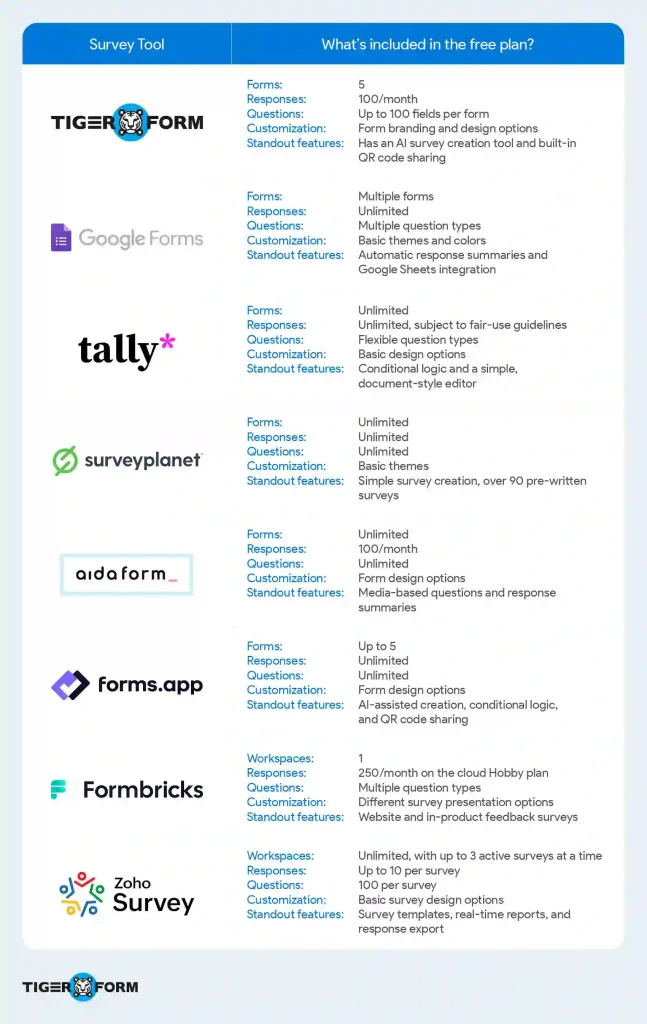
A closer look at the 8 free survey form builders
1. TIGER FORM
TIGER FORM is a free survey form creator for businesses that want to create surveys, gather feedback, and share forms online or through QR codes. Its feature set includes an AI-assisted form builder, ready-made templates, a drag-and-drop editor, customization options, and response tracking. QR-code sharing also gives teams a way to collect feedback at physical locations, such as stores, events, or service counters.
Notable features include:
- AI survey generator
- Ready-made form templates
- Drag-and-drop form builder
- Customizable forms and branding
- Built-in QR code generator
- QR-code sharing and dynamic QR codes
- Survey response tracking and management
| Plan | Price | Forms | Monthly submissions |
| Freemium | $0/month | 5 | 100 |
| Starter | $14/month, billed annually | 25 | 1,000 |
| Business | $32/month, billed annually | 50 | 2,000 |
| Professional | $113/month, billed annually | 130 | 6,000 |
| Enterprise | Custom pricing | Custom | Custom |
The free plan also includes up to 100 fields per form, 100 MB of storage, 1,000 viewers per month, and one team user.
Check the TIGER FORM pricing page for the latest details.
2. Google Forms
Google Forms is a straightforward free survey tool for running polls, questionnaires, and feedback forms. It works well for individuals, students, and businesses that need to collect responses without setting up a complex workflow. You can also connect Google Form responses to Google Sheets for easier analysis.
Useful features include:
- Ready-made templates
- Multiple question types
- Basic theme and color customization
- Conditional question routing
- Real-time response summaries
- Google Sheets integration
- Sharing through links and email
| Plan | Price | Forms | Response limits |
| Google Forms | Free | No standard form creation limit | unlimited |
Google Forms is available at no additional cost with a Google account. Storage and some usage limits may depend on your Google account or Google Workspace plan.
3. Tally
Tally is a free online form creator with a simple, document-style editor. You can use it to create surveys, feedback forms, and questionnaires. Tally forms free plan includes unlimited forms and submissions, subject to fair-use guidelines.
Notable features include:
- Unlimited forms and submissions (subject to fair use)
- Multiple question types
- Conditional logic
- Customizable form layouts
- File uploads
- Integration with tools such as Notion and Google Sheets
| Plan | Price | Forms | Submissions |
| Free | Unlimited | Unlimited, subject to fair use | |
| Pro | $24/month, billed annually | Unlimited | Higher usage and additional features |
| Business | $74/month, billed annually | Unlimited | Advanced features and team controls |
4. SurveyPlanet
SurveyPlanet is a good option for users who need to create long questionnaires, polls, and collect a high volume of feedback responses. It’s worth considering for basic surveys, especially when you want to get started quickly.
Core features include:
- Basic survey themes
- Basic in-app reports
- Survey categories
- Pre-written survey templates
- Share surveys with email
| Plan | Price | Forms | Submissions |
| Free | $0/month | Unlimited surveys | Unlimited responses |
| Pro | $20/month | Unlimited surveys | Unlimited responses |
| Enterprise | Custom pricing | Custom | Custom |
5. AidaForm
AidaForm supports surveys, quizzes, registrations, and order forms, with options to match your needs. It also includes media-based answers, so respondents can submit video or audio responses where that format suits the question.
Notable survey form features
- Form creation tools
- Video and audio answers
- E-mail notifications for form owners
- Zapier and Google Sheets integration:
| Plan | Price | Forms | Submissions |
| Free | $0/month | Unlimited surveys | 100 responses/ month |
| Starter | $12/month | Unlimited surveys | 1000 responses/ month |
| Expert | $24/month | Unlimited surveys | 5000 responses/ month |
| Ultimate | $40/month | Unlimited surveys | 10000 responses/ month |
6. forms.app
Forms.app combines a form builder with AI-assisted creation or ready-made templates. It offers a range of question types, customization options, and response analysis tools to help you gather and understand feedback.
Core survey features
- 30+ field types for different questions and data needs
- Conditional logic
- E-signatures
- Pre-filled forms
- Live customer support
- AI-powered features
| Plan | Price | Forms | Submissions |
| Free | $0/month | 5 | Unlimited |
| Basic | $19/month, billed annually | 25 | Unlimited |
| Pro | $29/month, billed annually | Unlimited | Unlimited |
| Premium | $59/month, billed annually | Unlimited | Unlimited |
7. Formbricks
Formbricks is an open-source free survey platform designed to collect feedback at different points in the customer journey. You can create surveys to share through links, display on websites, or run directly inside apps.
Core survey features
- Link-based surveys
- In-product surveys
- All question types
- Conditional logic
- Recall information
| Plan | Price | Workspaces | Monthly responses |
| Hobby | Free | 1 | 250 |
| Pro | $74/month, billed annually | 3 | 2,000 |
| Scale | $325/month, billed annually | 5 | 5,000 |
| Enterprise | Custom pricing | Custom | Custom |
8. Zoho Survey
Zoho Survey is an easy tool to create surveys for customer feedback, employee satisfaction, and market research. It offers ready-made templates and a drag-and-drop builder, so you can put together questionnaires without starting from scratch. You can also share surveys across different channels and view responses through real-time reports.
Core survey features
- Skip logic and question branching
- Multilingual surveys
- Real-time reports and analytics
- Bulk question builder to add multiple questions at once
- Offline response collection with later syncing
| Plan | Price (annual billing) | Questions per survey | Response limit |
| Free | $0/month | 10 | 100 per survey |
| Basic | $7.42/month | Unlimited | 12,000 per year |
| Plus | $25/month | Unlimited | Unlimited annually |
| Pro | $35/month | Unlimited | Unlimited annually |
| Enterprise | $75/month | Unlimited | Unlimited annually |
Response limits for monthly billing are 3,000 per month for Plus, 5,000 for Pro, and 7,000 for Enterprise.
Note: Pricing, free-plan limits, and available features can change over time. Some tools also restrict advanced features to paid plans. Check each tool’s official pricing page before making a decision, especially if you expect your survey needs to grow or require additional features later.
How to choose the best survey tool for your needs
The best survey tool isn’t necessarily the one with the most features. It’s the one that helps you create the right questions, reach your audience, and make sense of the answers without adding extra work. Here are the key things to consider before choosing one:
1. Start with your survey goal
Decide what you want to learn. Are you collecting customer feedback, checking employee satisfaction, or researching what people think about a product? Each survey has a different purpose, so knowing what you need will help you choose the right questions and features.
For example, if you want to understand why customers stop buying from you, you’ll need questions that explore their experience, not just a general satisfaction rating.
2. Check the available question types
Choose a survey creator that supports the way you want people to respond. Multiple-choice questions and rating scales are useful for collecting structured answers, while open-text questions let people explain their opinions in their own words. Some surveys may also need ranking questions or file uploads.
Try to strike a balance. Too many open-ended questions can make a survey feel long, but relying only on multiple-choice questions may leave you wondering why people chose a particular answer.
3. Look for conditional logic
Conditional logic changes which questions respondents see based on their previous answers. This helps keep surveys relevant instead of asking everyone the same set of questions, even when some don’t apply to them.
For instance, if someone says they’re unhappy with a service, you can ask what went wrong. Someone who gives a positive rating can move on to a different question. This makes the survey more focused and easier to complete.
4. Check reporting and export options
Choose a tool that makes it easy to view survey results and export responses to Excel or CSV. This helps you understand feedback and share results with your team.
5. Consider how you’ll share your survey
Think about where your audience is most likely to see and complete the survey. Depending on the tool, you may be able to share it through a link, email, website embed, or QR code. Choose options that fit how you already communicate with people.
If you collect feedback in a physical store or at an event, QR codes can make it easier for people to open the survey on their phones. For remote audiences, an email invitation or shareable link may be more practical.
6. Read the free plan limits carefully
A free plan can be enough to get started, but limits vary by tool. Check how many surveys you can create, how many questions each survey can include, and how many responses you can collect. Some tools also limit users, exports, or advanced features.
Don’t focus on unlimited surveys alone. If you can create as many surveys as you want but can only collect 100 responses per month, that limit may become a problem as your audience grows.
7. Check how the tool presents survey results
Collecting responses is only useful if you can understand what they tell you. Look for clear summaries, charts, filters, and response exports. If you plan to compare results over time or analyze large amounts of feedback, check whether the reporting tools can handle that work.
For a short poll, a basic response summary may be all you need. For a longer customer survey, being able to compare ratings and review written comments can help you spot recurring issues.
8. Check customization options and integrations
Look for a survey tool that lets you customize colors, add your logo, adjust the layout, and tailor questions to your needs. A survey that matches your brand can feel more familiar and professional to customers and clients.
Also, check whether the tool integrates with platforms you already use, such as Google Sheets, a CRM, an email platform, or an automation tool. The right integrations help transfer responses automatically, saving you from downloading data and copying information between platforms.
9. Test the mobile experience and accessibility
Many people open surveys on their phones, so check how the form looks and behaves on a smaller screen. Questions should be easy to read, answer options should be simple to tap, and respondents shouldn’t have to zoom in or scroll through a cluttered layout.
This matters even more when you’re sharing surveys through QR codes or asking people to respond while they’re away from their desks.
10. Review privacy and data management
Understand how the tool handles and stores data. Check who can access responses, whether you can export or delete them, and what data privacy controls are available. If you’re collecting personal, customer, or employee information, make sure the platform meets your organization’s requirements.
It’s worth checking these details before you launch the survey, especially if the responses contain information that shouldn’t be widely accessible.
The bottom line: Compare survey tools based on what you actually need, not just the number of features they advertise.
Types of surveys and the best free survey tools for each
| Survey use case | Tools to consider | Features that make them suitable |
| Customer feedback surveys | TIGER FORM, Google Forms, Tally | TIGER FORM can generate a survey draft from a prompt, saving you time when writing questions. Google Forms summarizes responses automatically. Tally lets you show follow-up questions based on what a customer says. |
| Customer satisfaction surveys | Zoho Survey, TIGER FORM, Google Forms | Zoho Survey offers templates for measuring customer satisfaction. TIGER FORM lets customers rate their visit by scanning a QR code at the counter or on the receipt Google Forms is a straightforward choice for collecting ratings and comments. |
| Employee satisfaction surveys | Zoho Survey, Tally, Google Forms | Zoho Survey has employee satisfaction and morale templates. Tally can show different questions based on employees’ answers. Google Forms works for simple workplace questionnaires. |
| Market research surveys | Zoho Survey, Google Forms, SurveyPlanet | Zoho Survey offers market research templates. Google Forms is useful for collecting responses in a spreadsheet. SurveyPlanet lets you ask as many questions as you need on its free plan. |
| Product feedback surveys | TIGER FORM, Zoho Survey, Tally | TIGER FORM helps you create a survey around a product or feature using AI-assisted form creation. Zoho Survey provides structured survey templates. Tally supports rating scales and ranking questions to compare customer preferences. |
| Website and in-product surveys | Formbricks, Tally, Google Forms | Formbricks lets you collect feedback on a website or in an app. Tally forms can be embedded on a webpage. Google Forms is useful when a simple linked or embedded questionnaire is enough. |
| Event feedback surveys | TIGER FORM, Zoho Survey, SurveyPlanet | TIGER FORM lets you create a feedback survey and share it through a QR code that attendees can scan at the venue to submit their responses. Zoho Survey offers ready-made event feedback templates. SurveyPlanet supports unlimited surveys and responses on its free plan. |
| Academic and student surveys | Google Forms, Tally, SurveyPlanet | Google Forms organizes responses in summaries and Google Sheets. Tally supports file uploads for assignments or research questionnaires. SurveyPlanet is useful for larger student surveys that need many questions and responses. |
| Quick polls and simple questionnaires | SurveyPlanet, Google Forms, Tally | SurveyPlanet lets you create unlimited polls and questions. Google Forms is handy for collecting quick votes. Tally offers rating scales and calculations when a poll needs more than a basic multiple-choice question. |
| Lead generation surveys | TIGER FORM, Tally, forms.app | TIGER FORM can help you create a lead questionnaire from a text prompt. Tally lets you use answers to direct potential customers to different follow-up questions or pages. Forms.app also offers AI-assisted form creation. |
| Brand awareness surveys | Zoho Survey, Google Forms, SurveyPlanet | Zoho Survey is useful for building structured questionnaires about brand recognition and preferences. Google Forms makes responses easy to review in Sheets. SurveyPlanet is worth considering when you need to ask a large audience several questions without a standard response cap. |
| Training and course evaluation surveys | Google Forms, Zoho Survey, TIGER FORM | Google Forms makes it easy to review participant ratings and comments. Zoho Survey offers templates for structured evaluations. TIGER FORM lets you share the survey by QR code at the end of the session, so attendees fill it out before they leave. |
Note: We selected these tools based on our research into their features and how well they fit different survey needs. The right choice for you will depend on the type of survey you’re creating and what you want to learn from the responses.

FAQs
1. What are the best free survey tools?
Some popular free survey tools are TIGER FORM, Google Forms, Tally, SurveyPlanet, AidaForm, forms.app, Formbricks, and Zoho Survey. The right choice depends on your response limits, customization needs, and the features you want.
2. What is the best free online survey tool for academic research?
Google Forms is a practical option for student projects and straightforward research questionnaires. For more complex studies, look for features such as conditional logic, response exports, and data analysis. Also, check your institution’s guidelines before choosing a platform.
3. Which free survey tool is best for anonymous surveys?
Google Forms and Tally can be used to collect anonymous responses when configured appropriately. Before sharing your anonymous survey, check whether email addresses or other identifying details are being collected, and avoid asking for personal information if anonymity is important.
4. Can I create a survey for free without a response limit?
Yes, several free survey tools allow unlimited responses or submissions, though some apply fair-use policies or other restrictions. Most tools have their own limits on responses, questions, or active surveys, so check the free plan details before choosing one.
5. What features should I look for in a free survey maker?
Look for the question types you need, easy survey sharing, mobile-friendly layouts, response summaries, and data exports. Depending on your goals, conditional logic, branding options, integrations, and QR code sharing may also be useful.
6. Can I create surveys using AI for free?
Yes, some survey tools offer AI-assisted creation on their free plans. For example, TIGER FORM and forms.app provide AI-assisted form creation. Check each tool’s current plan details to see which AI features are included at no cost.
7. Are free survey tools suitable for business use?
Yes. Free survey tools can work well for customer feedback, employee questionnaires, event evaluations, and small market research projects. If you expect a high volume of responses or need advanced reporting and integrations, compare the paid plans before committing.
8. How do I choose the right free survey tool for my needs?
Start by identifying the purpose of your survey and the audience you want to reach. Then compare response limits, question types, customization, reporting, sharing options, and pricing. Choose a tool that covers your current needs without making it difficult to manage responses as your survey grows.
Start collecting better feedback with the right survey tool
The best free survey tool is one that fits your audience, supports the questions you want to ask, and gives you enough insight to act on the responses. Before settling on one, consider how many responses you expect, which features you need, and whether the free plan can support you as you grow.
Explore these survey form templates for ideas and build a questionnaire that gets useful answers.