
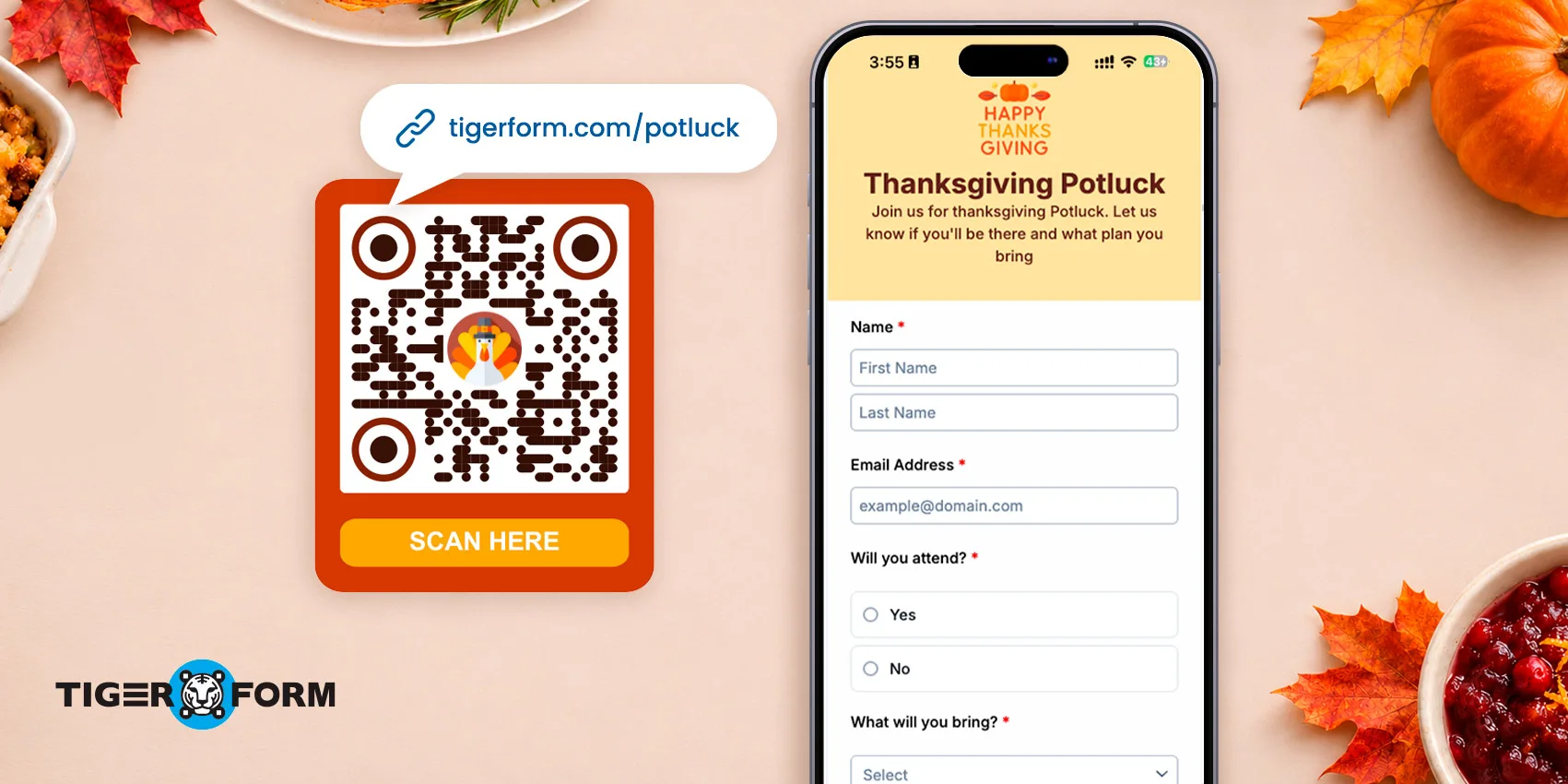
A Thanksgiving potluck sign-up sheet helps hosts track RSVPs, food contributions, and guest preferences for a Thanksgiving gathering.
When guest responses are spread across chat messages, it can be difficult to see which dishes are taken and which items are still needed. A sign-up sheet collects RSVPs and dish selections in one place.
Hosts can review responses, spot menu gaps, and follow up with guests before the event.
In this article, you’ll learn how to create a free Thanksgiving potluck sign-up sheet using TIGER FORM, an online form builder and form QR code generator. You’ll also discover how to adjust it to fit your gathering and share it with guests through a link or QR code.
Key takeaways
- Use TIGER FORM’s Thanksgiving Potluck RSVP Form template. It already has fields for guest name and email, attendance, dish type, and dietary restrictions.
- Add your event date, time, and venue to the form description. Then add questions on servings per dish, drinks, and utensils to see what’s missing from the menu.
- Share the finished form as a link in group chats and email, or as a QR code from TIGER FORM’s form QR code generator on printed invitations and flyers.
How to use a Thanksgiving Potluck RSVP Form template
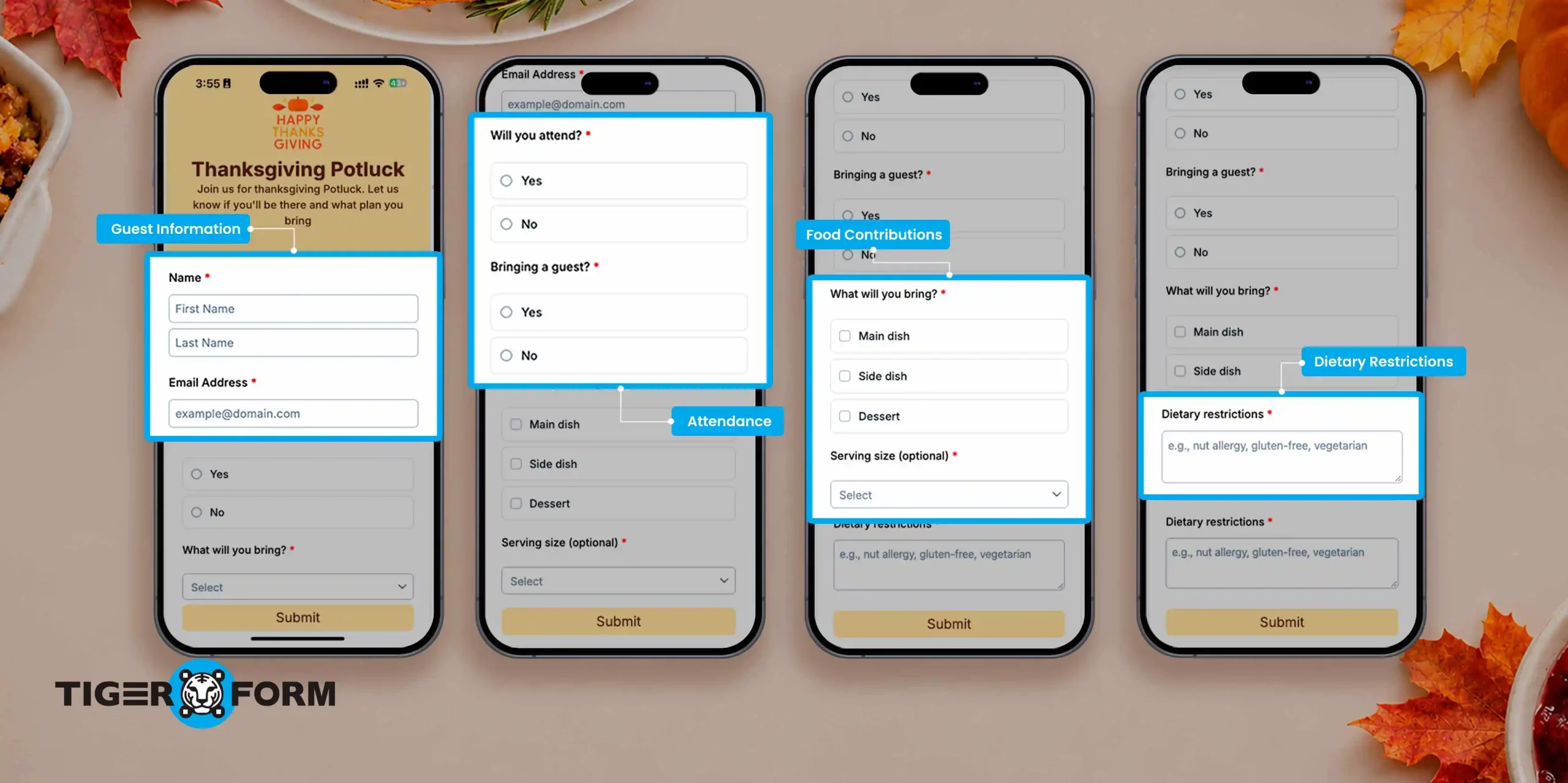
TIGER FORM offers a Thanksgiving Potluck RSVP Form template that already includes:
- Guest information. Collect guests’ names and email addresses.
- Attendance confirmation. Find out who plans to attend and whether they’re bringing someone along.
- Food contributions. Let guests indicate whether they’re bringing a main dish, side dish, or dessert.
- Dietary restrictions. Give guests a way to share food allergies or dietary requirements.
That’s enough for a small family dinner. For a larger Friendsgiving sign-up sheet, add questions about serving sizes and who’s covering drinks.
Online vs. printable potluck sign-up sheet
A printable potluck sign-up sheet works for small gatherings, but an online sheet makes coordinating easier. Guests can sign up from their phones, and every response is collected in one place, so hosts don’t have to track a paper sheet passed around among guests.
You can also add the form’s QR code to a printed invitation, giving guests an easy way to sign up without typing a link.
How to create a free Thanksgiving potluck sign-up sheet online
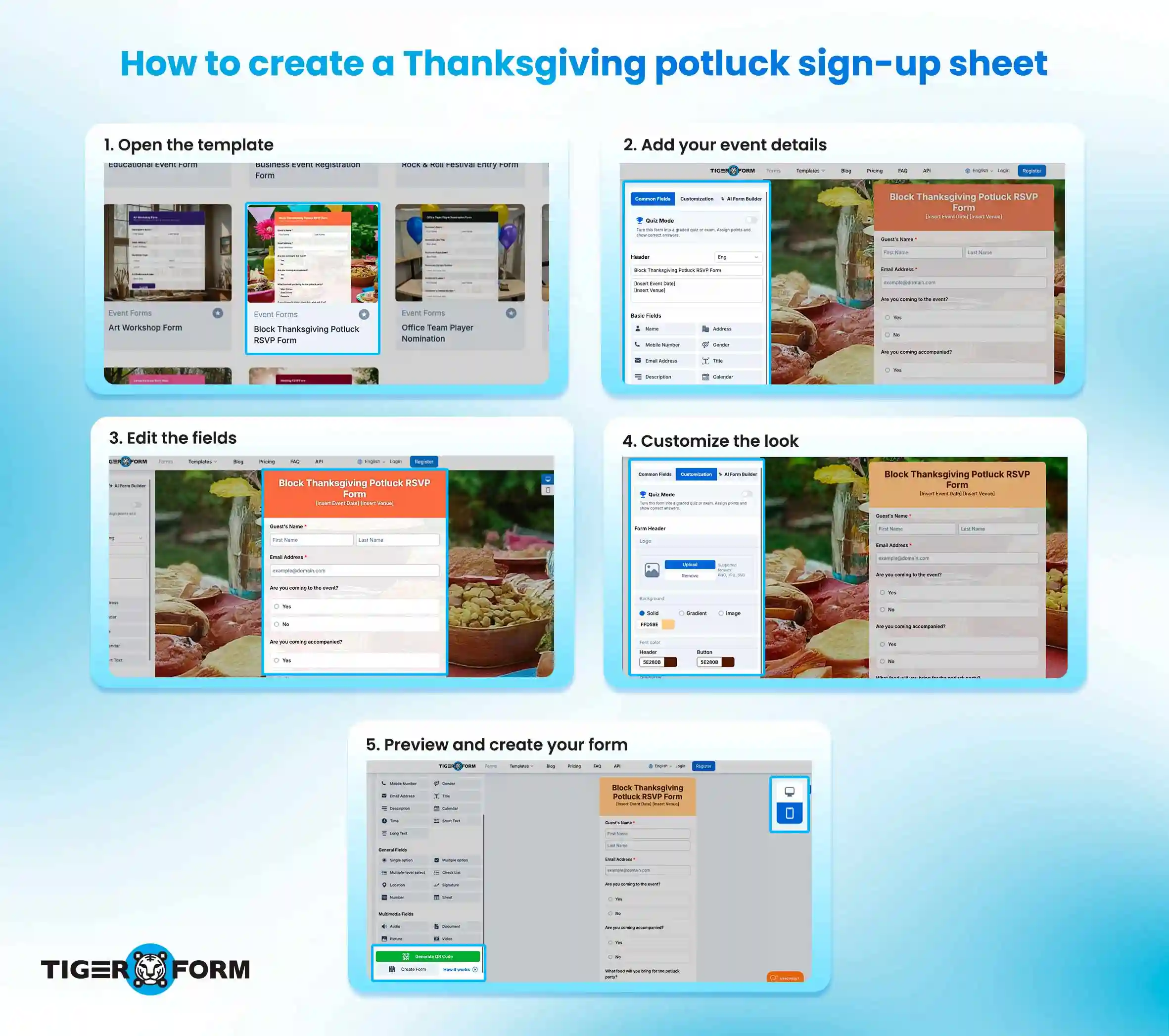
Use the template as your starting point for a potluck sign-up sheet online. Here’s how:
1. Open the template
Go to the Thanksgiving Potluck RSVP Form and click Use Template. If prompted, sign in to your TIGER FORM account or create one to continue.
2. Add your event details
Update the form title and description with the date, time, venue, and anything guests should know before signing up.
This is also a good place to mention whether dishes should be homemade, roughly how many people each dish should serve, and whether you need drinks or utensils.
3. Edit the fields
The template already includes names and email addresses, attendance, and food contributions. You only need to adjust the fields or add questions for anything else you need to know. For example, you can ask:
– How many servings the dish will make
– Whether they can also bring drinks, ice, or utensils
– How many people they’re bringing, if a “yes or no” answer isn’t enough for your headcount
You can add short text, long text, and single-choice fields. For larger Friendsgiving gatherings, you can also follow this guide to create an event registration form.
4. Customize the look
Adjust the form header, logo, background, and colors to make it easy to read. Keep the layout simple, with clear questions and short instructions, since most guests will fill it out on their phones.
5. Preview and create your form
Open the preview on mobile and desktop, and check the questions, answer options, and event details for anything missing or confusing. Once everything is ready, create your form. You can then copy its shareable link or generate a QR code using TIGER FORM’s built-in form QR code generator.

How to share your Thanksgiving potluck sign-up sheet by link or QR code
Share the form link
Click the Share icon to access your shareable link. Copy the link and send it through your preferred messaging platform or email. You can post it in a family group chat, send it to individual guests, or include it in your digital invitations.
This works well when most guests coordinate through messaging apps. They can open the link directly and complete the form without needing a paper sign-up sheet.
Share the form using a QR code
You can also generate a QR code that opens your form when scanned. This option is useful when inviting people in person or distributing printed invitations.
Place the QR code on a Thanksgiving invitation, event flyer, or announcement so guests can open the form without manually typing a web address.
You can customize and download the QR code for use in printed or digital materials. For more details, read this guide on sharing forms with QR codes.
Tips for organizing a Thanksgiving potluck
A potluck sign-up sheet collects contributions, but a few ground rules can prevent confusion before the gathering.
• Set a sign-up deadline
Give guests enough time to decide what they’ll bring, but set a deadline so you can finalize the menu and prepare for the event. Include the date in your form description and remind guests to submit their responses before then.
• Divide food contributions into categories
List the types of food you need, such as appetizers, main dishes, side dishes, desserts, and drinks. This gives guests a better idea of what’s missing and helps you avoid having too many similar contributions.
• Ask about serving size
A dish that serves four people may not be enough for a gathering of twenty. Ask guests how many servings they can provide so you can estimate whether there’s enough food for everyone.
Planning dishes and portions ahead of time can also help prevent unnecessary food waste. The EPA shares practical ways to reduce food waste during holiday meals, including planning portions and making use of leftovers.
• Account for dietary restrictions
Include a question about food allergies, dietary preferences, or ingredients guests need to avoid. You can also ask contributors to list the main ingredients in their dishes so attendees can make informed choices.
For packaged ingredients, the FDA’s food allergy guidance explains how common allergens are identified in food labels.
• Share event details with your guests
Make sure guests can easily find the event, date, time, location, and instructions about food preparation or transportation. If the venue or schedule changes, send an update through the same communication channel you used to distribute the form.
• Keep food at safe temperatures
Remind guests to consider how they’ll transport and serve their dishes, especially if the food needs to stay hot or cold.
According to USDA food safety guidelines, keep cold foods at 40°F or below and hot foods at 140°F or above. Avoid leaving perishable food at room temperature for more than 2 hours to reduce the risk of bacterial growth.
FAQs
Where can I get a free Thanksgiving potluck sign-up sheet?
You can use an online form template such as TIGER FORM’s Thanksgiving Potluck RSVP Form. It includes fields for guest details, attendance, food contributions, and dietary restrictions. You can customize the form and share it through a link or QR code.
Is there a printable potluck sign-up sheet?
Printables work for small groups; an online form lets guests sign up from their phones and keeps every response in one place, and you can print the QR code on your invitation.
How do I create a potluck sign-up sheet online?
Choose an online form builder and start with a potluck template or create a form from scratch. Add fields for guest names, attendance, food contributions, and dietary requirements. Review the form before sharing its link or QR code with guests.
What should I include in a Thanksgiving potluck sign-up sheet?
Include guest names and contact details, attendance confirmation, food categories, specific dish contributions, and dietary restrictions. You may also ask about serving sizes and additional items guests can bring, such as drinks or utensils.
Can I use an online potluck sign-up sheet for Friendsgiving?
Yes, you can use the same type of form for Friendsgiving gatherings. Change the title and event details, then adjust the questions to match your guest list and food plans.
How can I prevent guests from bringing the same dish?
Ask guests to specify the exact dish they plan to bring instead of selecting only a general category, such as main course or dessert. Review the submitted responses and let guests know if a particular dish is already covered. You can also share an updated list of contributions in your group chat or event announcement.
Can I share a potluck sign-up sheet using a QR code?
Yes. You can generate a QR code linked directly to your online form. Download the code and include it in digital or printed invitations, flyers, and event announcements. Guests can scan it with their smartphones to open the sign-up sheet.
Run a smoother Thanksgiving potluck with TIGER FORM
TIGER FORM’s Thanksgiving Potluck RSVP Form template collects guest names, attendance, food contributions, and dietary restrictions in one form. You can edit the questions to fit your gathering and share the form by link or as a QR code with TIGER FORM’s form QR code generator. You can also explore other event forms for different occasions.
Use the template to create your Thanksgiving potluck sign-up sheet and start collecting guest responses.