
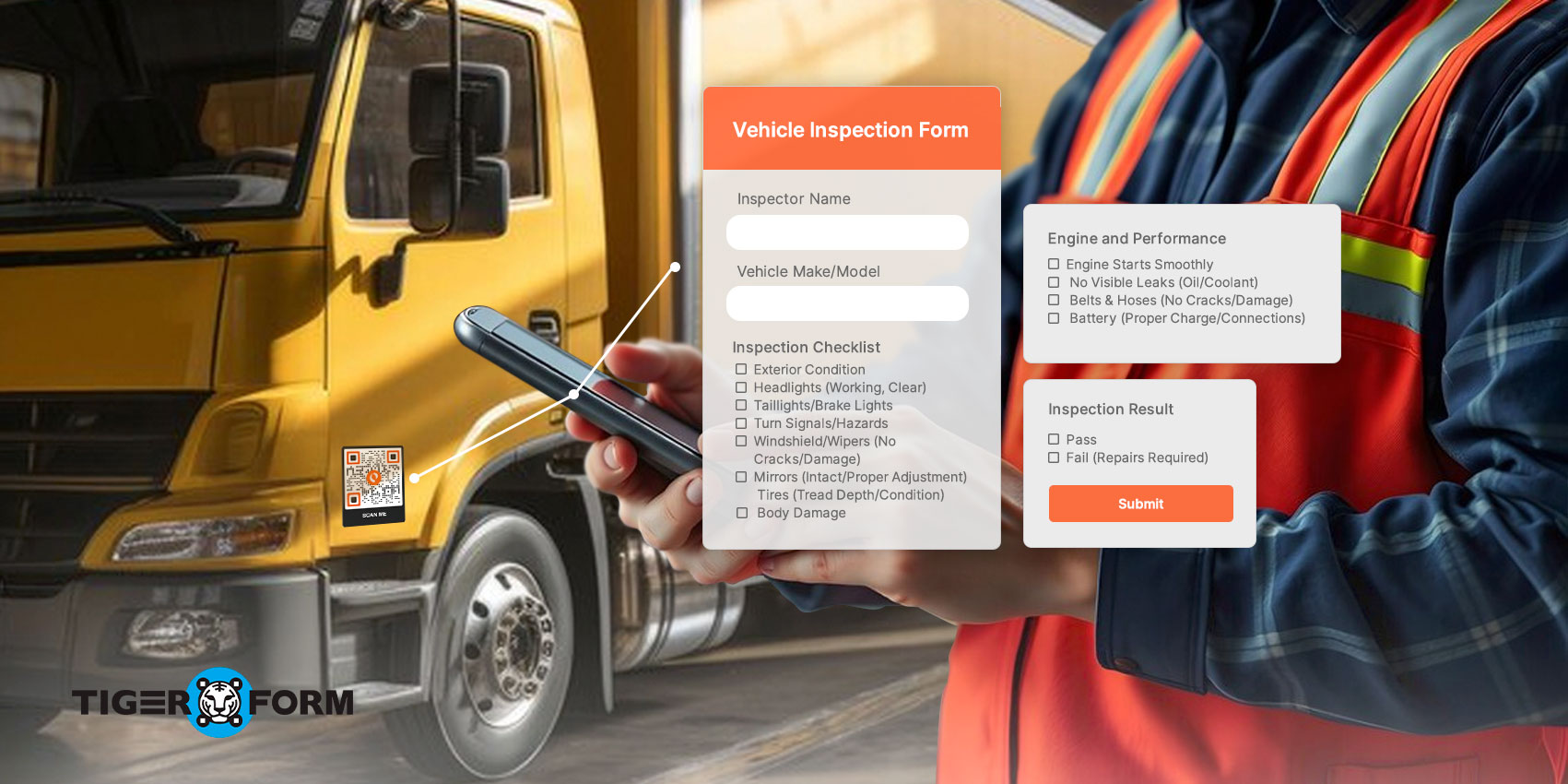
A vehicle inspection is a regular check-up to test if vehicles meet road safety and environmental standards. Managing vehicles can be complicated, especially when every car needs to be in its best condition. Daily or regular pre-use checks are required for compliance and to ensure the drivers reach their destination safely.
An inspection report form for transportation ensures that every vehicle component is checked for safety. Using a QR code in the inspection process can speed up and improve data entry, record-keeping, and compliance tracking.
Let’s learn about the importance of vehicle inspections, the role of an inspection report form, and how QR codes can simplify and improve the overall process.
Why is vehicle inspection important?
Proper vehicle inspections can reduce the risk of crashes. It helps make sure that everything is working properly and safely. Pairing inspections with a passenger feedback form also gives operators real-world input from passengers, helping identify issues that may not be visible during routine checks.
With a vehicle inspection checklist, you get a system that keeps vehicles safe and in good condition. Combined with a passenger feedback form, teams can monitor both vehicle performance and passenger experience. This is useful for daily and regular inspections, especially for commercial vehicles. Here is why it is important:
- Spend less on gas: A vehicle inspection identifies issues that can increase your vehicle’s fuel consumption, so you can make the necessary repairs.
- Keep insurance costs low: A faulty vehicle poses a risk to others and can result in severe injury or death. With regular pre-use safety inspections, you can keep your drivers safe by identifying faulty vehicles. This also helps you avoid higher premiums for health plans and workers’ compensation.
- Limit liability exposure: Most safety laws and regulations, such as DOT inspection regulations and OSHA vehicle inspection requirements, require companies in the transportation industry to inspect their vehicles before use. Inspecting your vehicle regularly helps you avoid government penalties, and you will always have a pre-use inspection report in case of an accident.
- Preventative maintenance: Vehicle inspection helps to prevent minor problems from becoming more prominent and costly.
- Extends the vehicle’s life: Regular inspection and maintenance help the vehicle last longer and operate at optimal performance. They also save you the unnecessary cost of repairs and replacements.
- Improve customer satisfaction: A vehicle in good condition is more reliable, breaks down less, and ensures on-time service. This leads to a better customer experience, boosting the business’s bottom line.
What is an inspection report form for transportation?

Vehicle inspection report forms are used to collect data and are later compiled into a report. To maintain consistent records, each digital inspection form includes an “effective date” to track when inspections are conducted and ensure compliance with scheduled maintenance timelines. Traditionally, these basic vehicle inspection forms are completed using a standard sheet of paper. However, the approach is tedious and inefficient. Here are some of the challenges in traditional methods:
- Vehicle inspection records are handwritten, which takes time and is prone to errors.
- Paperwork during and after the inspection can be overwhelming for staff.
- Retrieving data or tracking vehicle repair history from a paper-based system is complex.
- Paper inspection forms must be completed in duplicate or triplicate, which adds an extra budget to the company.
Due to the drawbacks of paper-based vehicle inspection forms, companies in the transportation industry have been transitioning to a paperless system. This approach allows the inspection technician to complete the forms digitally using inspection software or a mobile app. Many businesses also offer a vehicle inspection form download option to make the transition smoother, providing easy access to digital templates that streamline the inspection process.
QR code for transportation further streamlines the process. When technicians scan the vehicle’s QR code, they can be redirected to a mobile-friendly website or app, such as those created with TIGER FORM, where they can enter information about the vehicle. The digital inspection form organizes inspection results, making information retrieval easy.
Digital inspection report forms also include additional features such as data search capabilities, offline form filling, and cloud data storage. Adding a QR code allows others to verify safety information. For example, parents can scan QR codes on school buses to access information on their phones.
What’s even better about using a form maker is that they can also create a passenger feedback form for an easy monitoring system.
Uses of basic vehicle inspection forms
The inspection report forms for transportation can be used for various purposes, such as completing commercial or safety inspections for specific vehicle parts. A vehicle inspection report template or checklist is commonly used to ensure that the inspector covers all necessary items and that the data is collected correctly.
Depending on your location, commercial vehicles may be mandated to be inspected for emissions and safety. Emissions tests are conducted regularly to control pollution and ensure vehicles meet environmental regulations. Meanwhile, safety inspections check whether cars are safe to drive.
For personal-use vehicles, inspections are conducted during the pre-purchase phase. The inspection aims to ensure that the car is ready to be sold. The inspection technician utilizes the mobile form to review the vehicle’s condition and assess any needed repairs. This ensures that the car is in top condition for the new owners.
Why transport businesses need inspection report software
Transportation businesses use inspection reporting software in many ways. Instead of relying on paper-based processes, which are often prone to errors, inspection software enhances the accuracy and reliability of reports.
With the right form builder, you can save time and money for your business. The best inspection form creators let you integrate a QR code that links to your software or website. These will help you to:
Eliminates cumbersome data entry
The platform can be used to create a form with an inspection checklist for all the necessary information needed during the inspection. Data is captured in real time and can be accessed by other vehicle inspectors.
Reduces risk and liability
Inspection in the transportation industry can contain important information for the business. The inspection data can easily get lost or become illegible when using paper documents. Digital inspection forms reduce the risk of losing information by saving it to the cloud and making it accessible at any time.
Provides insights into inspection reports
It is usually difficult to spot trends manually, capture data, or use paper forms. The staff will still need to spend a lot of time summarizing the report and generating valuable insights. In contrast, a digital inspection form produces key insights instantly. These insights can also be accessed immediately, allowing necessary action to be taken.
Uses of basic vehicle inspection forms
The inspection report forms for transportation can be used for various purposes, such as completing commercial or safety inspections for specific vehicle parts. A vehicle inspection report template or checklist is commonly used to ensure that the inspector covers all necessary items and that the data is collected correctly.
Depending on your location, commercial vehicles may be mandated to be inspected for emissions and safety. Emissions tests are conducted regularly to control pollution and ensure vehicles meet environmental regulations. Meanwhile, safety inspections check whether cars are safe to drive.
For personal-use vehicles, inspections are conducted during the pre-purchase phase. The inspection aims to ensure that the car is ready to be sold. The inspection technician utilizes the mobile form to review the vehicle’s condition and assess any needed repairs. This ensures that the car is in top condition for the new owners.
What are QR code forms for vehicle inspection?
QR code forms are digital inspection checklists that open when a phone or tablet scans a QR code. Instead of using paper, inspectors can instantly access the form, record details, and submit it on-site. This helps speed up the process, reduce mistakes, and keep records consistent.
This guide explains how QR codes improve inspections and support faster reporting. By linking a QR code to a digital form, your team can scan, complete, and submit reports in one smooth step. The data saves automatically, making it easier to track issues, repairs, and compliance.
To create form setups that fit your inspection needs, use a customizable form builder. It should let you add vehicle details, safety checklists, defect reports, photos, and signatures in one place. Using a free online builder helps you build forms efficiently while keeping your inspections organized and cost-effective.
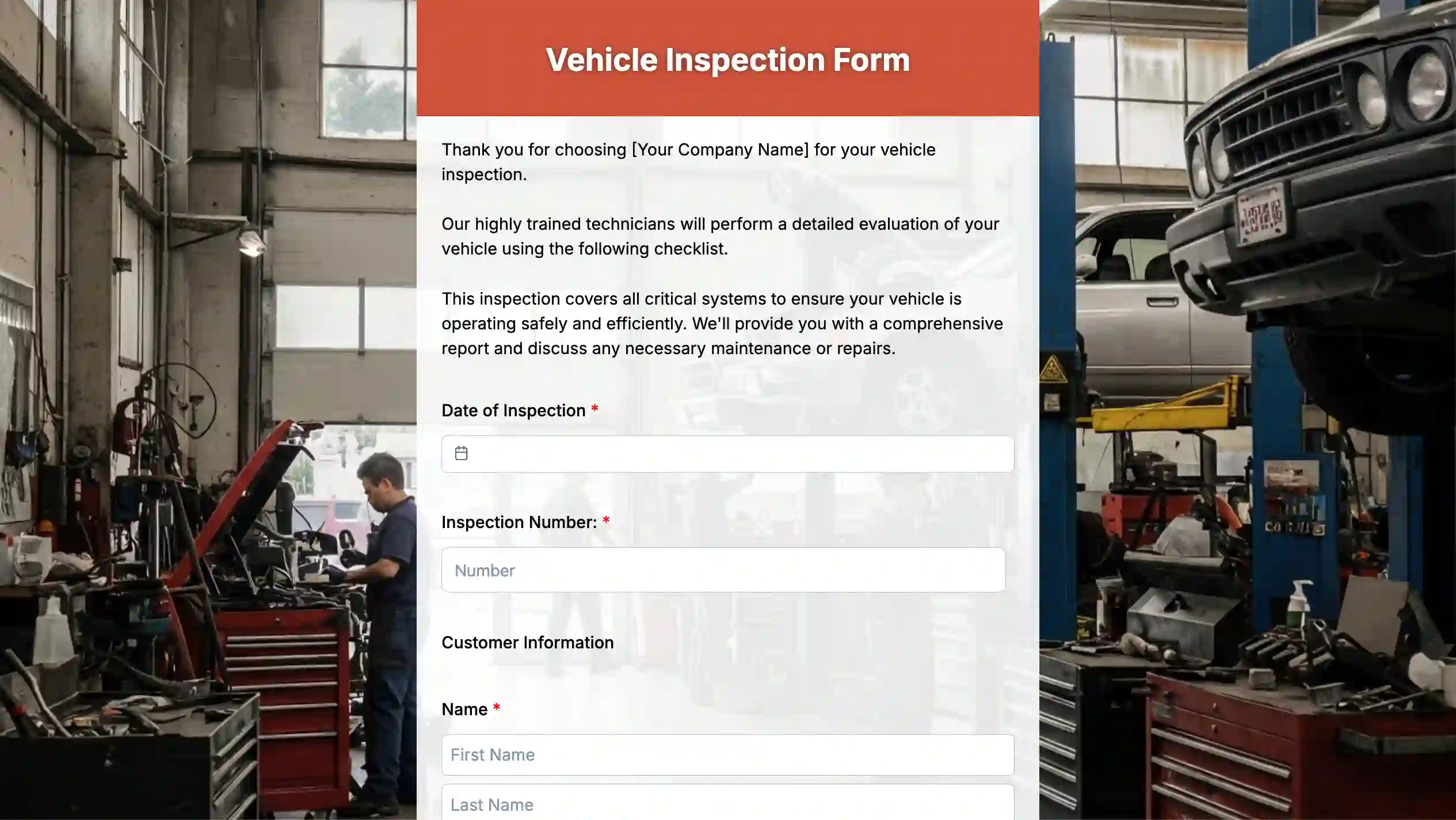
How to create an inspection report form for transportation
Once you understand what an inspection report needs to capture, you can start building the form using an online form builder. The process is simple and follows a precise flow.
1. Sign up for a form builder
To start creating an online vehicle inspection form. Choose an online form tool and create an account.
2. Start with a template and an AI form generator
Create a form from scratch or select a vehicle inspection form template to save time. Templates help you cover everyday inspection items without having to start over. Another tool you can use to create your forms faster is an AI-powered form maker. With just prompts, you can generate forms in minutes.
3. Add inspection fields and checklists
Insert fields for vehicle details, inspection date, inspector name, and condition checks. Mark required fields so inspectors do not skip critical safety items. Add photo upload and notes fields for clear defect reporting. Set up the corrective action and sign-off fields. Include sections for recorded defects, required actions, and inspector or supervisor sign-off. This helps track what needs fixing and who approved the report.
4. Generate and link a QR code
Once the form is ready, create a QR code that links directly to it. You can place the QR code on vehicles, clipboards, or inspection areas for quick access.
5. Share and use the form during inspections
Inspectors scan the QR code using their phone and complete the form on the spot. Submissions are saved instantly and stored in one place.
6. Review submissions and follow-up
Use the builder’s dashboard to review inspection reports, track unresolved issues, and download records for the transportation compliance checklist or audits.

Benefits of the QR code inspection report form for transportation

The integration of QR codes into transportation inspection report forms enhances data collection and retrieval. Upon scanning the inspection form QR code, the technician accesses a checklist for inspecting the vehicle. Other staff can scan the same QR code to determine the inspection results. This technology is beneficial because of:
Effective scheduling and tracking of inspections
QR codes allow you to schedule and track inspections from anywhere. With a quick scan on your mobile device, you can easily schedule inspections, reschedule tasks, and track progress. For businesses that prefer physical documentation, a free printable driver vehicle inspection report form can complement the QR code system, offering digital and printed options for easy reference. This approach to effortless task management makes inspection reporting quick and easy.
Faster completion of inspection reports
QR codes can link the user to customizable transport inspection checklists, form templates, and auto-text dictionaries. These help employees create detailed reports during the inspection and fill in all essential details before leaving the site.
All you need is a smartphone
Inspection technicians and other employees can access inspection reports by scanning the QR code on their smartphones. This saves time when creating reports and provides a more consistent approach.
Businesses can even add a promotional form for advertising inside a vehicle. Passengers can engage with the ad by scanning the QR code using their smartphone or device. And even when the car is moving, they can access the ad easily.
Why use TIGER FORM
QR forms allow you to build better inspection report forms for transportation. You can capture more information and let your teams focus on what matters the most. The form creator is ideal for inspection reports:
Easy-to-use vehicle inspection report template
The platform lets you quickly create transport inspection report forms with QR codes. Each QR code links to a digital inspection form for transportation, so team members can scan, complete the checklist, and submit the report right away. Saved entries stay updated and easy to review.
Quick QR code
It provides an easy way to generate QR codes for inspection reports. You can create custom codes and adjust options such as text and images to suit your brand.
Not only can transportation use dedicated software for digital form QR codes. Other industries can use it to improve their internal systems. The utility industry, for example, can use it to create an energy report form to streamline the process.
Efficient task assignment
Scheduling inspection-related tasks can be complex and time-consuming. Adding a QR code for transport in your inspection reports can help. It will ensure employees are at the right job site at the right time. By automating the inspection report review and job assignment, QR forms can maximize productivity and service levels.
Enhance the Safety of your vehicles with an inspection report form
It cannot be overemphasized how important it is to inspect vehicles in the transport industry regularly. Using QR codes in a vehicle inspection report form for transportation is a smart way to manage inspections. It will simplify data collection, reduce errors, and ensure safety compliance.
A scan to access and update reports ensures your fleet runs safely. Embrace digital transformation, streamline inspections, enhance vehicle safety, and boost productivity.
Check out our form builder and start keeping accurate records of all your inspections, repairs, and services rendered on the vehicles.

FAQs
Who should use this inspection report form?
This form is for anyone responsible for vehicle safety and operations. That usually includes fleet managers, safety officers, mechanics or maintenance staff, drivers doing pre‑ or post‑trip checks, and external inspectors or auditors.
What sections are typically included in the form?
Most forms include basic vehicle details (like VIN, plate number, and make/model), the inspection date and time, and the inspector’s name.
You’ll also see a checklist of items to inspect, space to list defects and actions needed, room for photos or notes, and a final sign‑off or submission status.
Is this form suitable for all transportation modes?
Yes. You can adapt the form for trucks, buses, rail vehicles, ground support equipment, or boats and ships. The key is updating the checklist so it matches the risks and requirements of each type of transport.
What standards or regulations should be reflected in the form?
The form should follow the safety and maintenance rules that apply to your operation. That usually means matching local or national regulations on vehicle safety, inspection frequency, licensing, and reporting deadlines.
How detailed should the inspection checklist be?
The checklist should cover all critical safety items but still be quick enough to use regularly. Aim to include must‑check points and give inspectors space to add notes for anything unusual or less urgent.
What is the recommended turnaround time after an inspection?
Routine inspections are usually reviewed and closed within 24–72 hours. Any serious safety issue should be acted on immediately and sent to the right team as soon as it’s found.
How is data security handled?
With digital forms, data is protected by user logins, permission controls, and secure storage. Features like encryption and edit history help prevent unauthorized access or changes.
Can this form be integrated with other systems?
Yes. You can connect the form to fleet, maintenance, or compliance tools so inspection data flows automatically through imports, exports, or direct integrations.
What common errors should be avoided when using the form?
Try to avoid leaving required fields empty, using vague defect descriptions, skipping photos when they would clarify an issue, submitting reports late, or forgetting to assign follow‑up actions for the problems you find.