

Forms still run a surprising amount of everyday work. Approvals, feedback, records, sign-offs, all of it quietly depends on them. But here’s the question teams are finally stopping to ask: which approach actually serves modern workflows better–digital or paper forms?
Paper forms feel familiar. It’s comfortable. It’s safe from cyber threats and digital tampering. But the problem shows up later. They slow teams down bit by bit, introduce small errors that grow over time, and make tracking anything feel harder than it should be.
Digital forms promise a different rhythm of work. Faster sharing. Cleaner data. Automation baked in. But are they always the better answer, or are they just marketed better?
This digital forms vs. paper forms comparison goes past surface-level convenience. This blog will unpack the real pros and cons, the trends pushing teams in one direction, and the problems each approach genuinely solves.
What are digital and paper forms?
Digital forms are online or electronic forms (e-forms) created using form builders or software. They’re accessed and filled out on a phone, tablet, or computer and often connect directly to databases, spreadsheets, or workflows. Many digital forms include features such as required fields, auto-save, real-time validation, and automation, which means data is captured, stored, and shared instantly without manual entry.
Paper forms, on the other hand, are printed documents that people fill out by hand. They rely entirely on manual processes, writing, signing, scanning, filing, and often retyping the information later. Paper forms don’t need internet access or devices, which is why they’re still common in environments where technology is limited or workflows are deeply traditional.
This comparison is important because of operational touchpoints. The way information is collected affects speed, accuracy, compliance, and decision-making. Choosing between digital and paper forms is all about how efficiently a business runs and how easily it can scale, adapt, and respond to change.
Direct head-to-head comparison: Digital forms vs. paper forms
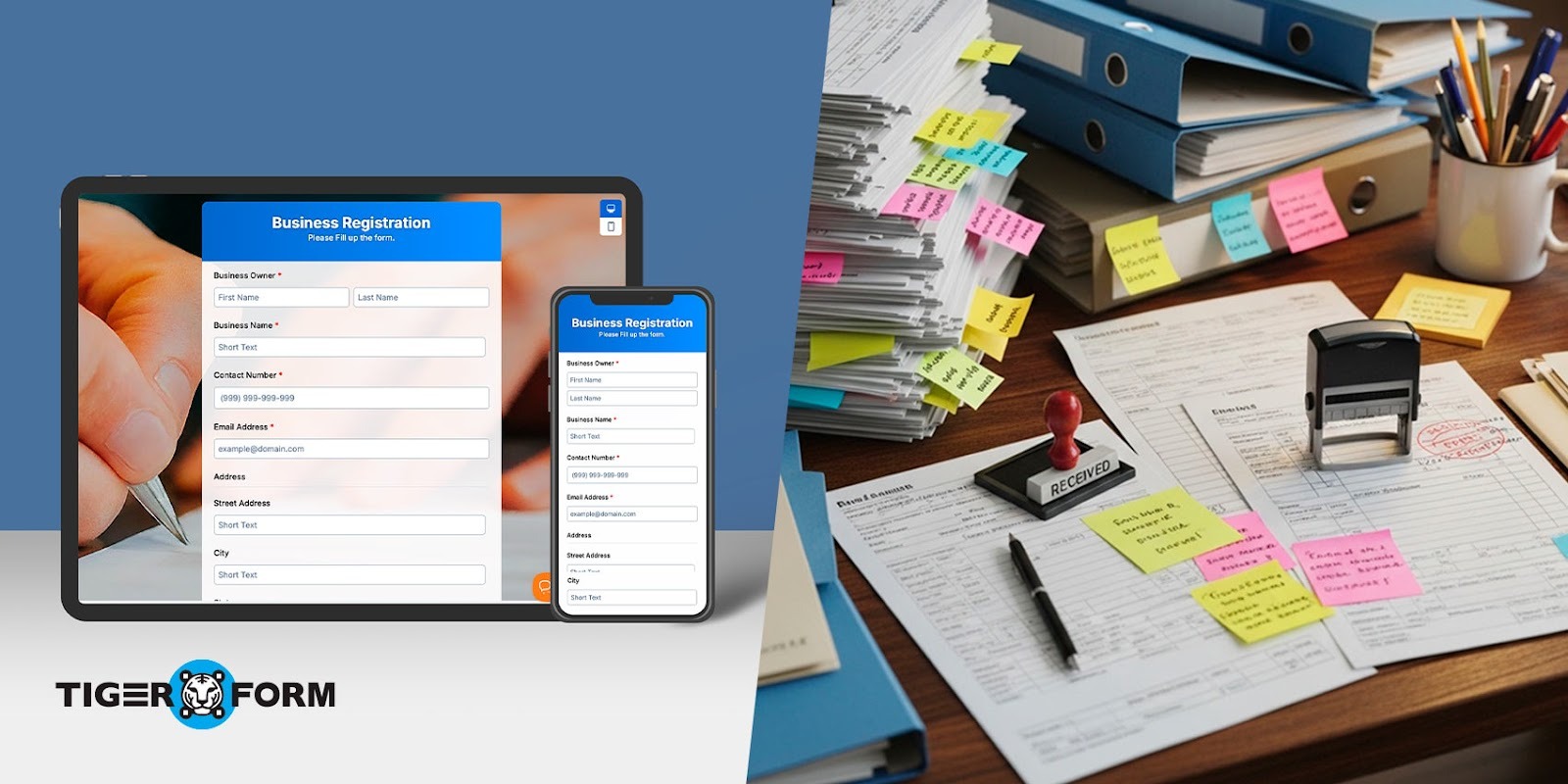
This is where the difference becomes obvious. When you compare how digital and paper forms perform in real workflows, the gap shows up fast, in time, cost, accuracy, and effort. The choice of data collection method directly affects how smoothly teams operate day to day.
1. Speed and workflow efficiency
Speed is where efficiency in digital forms clearly stands out. Digital forms capture data instantly and push it straight into systems, spreadsheets, or dashboards. According to EasySend, companies report 30–50% reductions in back-office processing time when they replace static forms with guided digital flows, mainly because data no longer needs to be manually checked, re-entered, or routed between teams.
Paper forms move at human speed. They need to be filled out, collected, sorted, reviewed, and often manually entered into another system. Each step adds delays, and over time, these small delays accumulate and slow down entire workflows.
2. Cost considerations
Paper forms come with hidden costs that add up quickly. Printing, paper, ink, physical storage, scanning, and manual data entry all require money and labor. The bigger the volume, the higher the expense, and none of it scales efficiently.
Online forms do involve software or platform costs, but they eliminate most physical and labor-heavy expenses. There’s no printing, no storage rooms, and far less manual work. For growing teams, this is one of the biggest digital form benefits: predictable costs without rising operational overhead.
3. Accuracy and data quality
Digitized forms are designed to reduce mistakes. Required fields, dropdowns, validation rules, and conditional logic ensure people submit complete and usable data. If something is wrong, the form catches it instantly.
Paper forms depend entirely on human accuracy. Fields get skipped. Data is entered differently by different people. These disadvantages lead to inconsistencies, errors, and extra cleanup work later.
4. Accessibility and distribution
Digital forms can be shared instantly through links, QR codes, emails, or apps. They work on phones, tablets, and laptops, making them ideal for remote teams, field staff, and customers on the move. Updates take seconds and apply everywhere.
Paper forms need to be distributed and collected via fax, mail, or face-to-face. That limits reach and flexibility. If a form changes, old versions keep circulating. And it eats up a lot of time. For fast-moving operations, this becomes a real bottleneck.
5. Security and compliance
Digital forms offer built-in security controls. Encryption, access permissions, audit logs, and automatic backups protect sensitive data and support compliance requirements. Information stays traceable and recoverable.
Paper forms are vulnerable by nature. They can be lost, damaged, stolen, or accessed by unauthorized parties. Once a paper document is gone, the data is often gone with it. Managing compliance manually also increases risk.
6. Environmental and sustainability impact
Paper forms rely on continuous resource use, paper, printing, transportation, and storage. High-volume processes create ongoing waste.
Digital forms significantly reduce paper consumption and physical storage needs. For organizations focused on sustainability, moving digital supports long-term environmental goals while also improving efficiency.
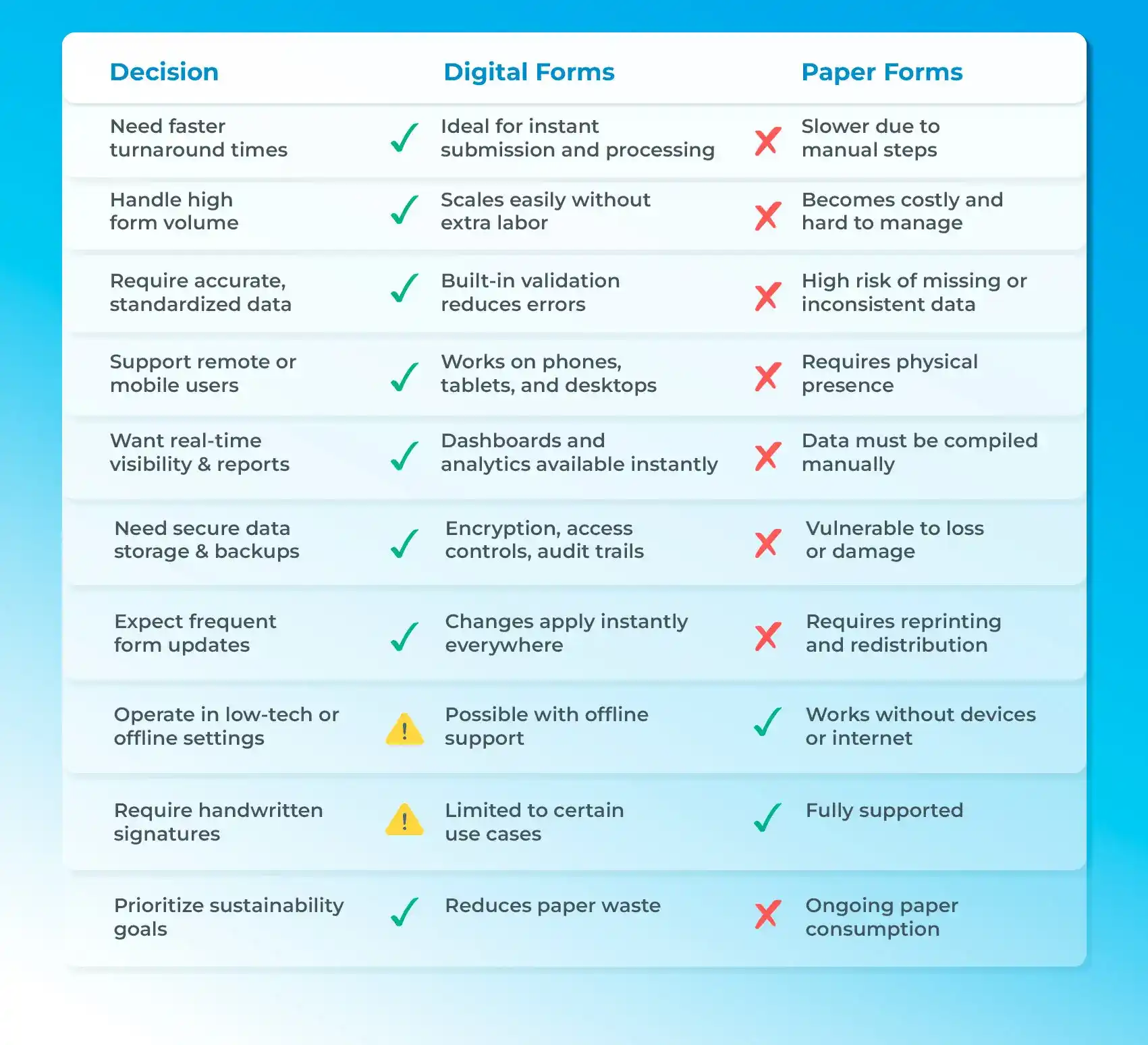
Online forms vs. paper forms: How to decide what’s right for your workflow

Create digital forms faster with an online form builder
An online form creator removes that overhead by turning form creation into a quick, repeatable process. Instead of starting from scratch, you use templates, automation, and smart logic to collect clean data from the start.
Step 1: Sign up and create your first form
Start by signing up on the online form creator. Once you’re in, you can create a new form instantly from the dashboard. There’s no setup complexity or learning curve. You’re taken straight to form creation, so you can start building right away.
This replaces hours of manual formatting and setup with a few clicks.
Step 2: Choose a ready-made form template
Instead of starting from a blank page, select a form template that fits your use case. TIGER FORM offers templates for feedback, registrations, surveys, inspections, HR requests, and more. For events, you can start with an event application form template and begin collecting attendee details and approvals right away. Each pre-designed form template is already structured with logical fields and flow, so you’re not guessing what to include.
Templates make digital form creation faster and more consistent from the start.
Step 3: Use AI form generation for faster setup
If you need something specific, TIGER FORM’s AI form generation helps you build forms even faster. Simply describe the form you need, such as “event registration form” or “employee onboarding form,” and the AI creates a complete form with relevant fields in seconds.
This is ideal when time is tight or requirements are still evolving.
Step 4: Customize fields and apply smart logic
Once the form is created, you can easily customize the form design. Add or remove fields, mark required questions, and use conditional logic so users only see questions that apply to them. This keeps forms short, focused, and easier to complete.
Built-in validation also helps reduce incomplete or incorrect submissions.
Step 5: Share the form instantly
With TIGER FORM, sharing takes seconds. You can do the form sharing with a QR code and embed it on your website, email, etc. The same form works smoothly on mobile, tablet, and desktop, making it accessible for anyone, anywhere.
Step 6: Collect responses and act in real time
As responses come in, data is captured instantly and stored securely. You can view submissions in real time, export data, or analyze trends without manual data entry. This makes it easier to respond faster and make informed decisions.
Step 7: Update, reuse, and scale
Need to make changes? Update a field once, and it applies everywhere. You can duplicate forms, reuse templates, and scale your workflows as your needs grow without starting from scratch.

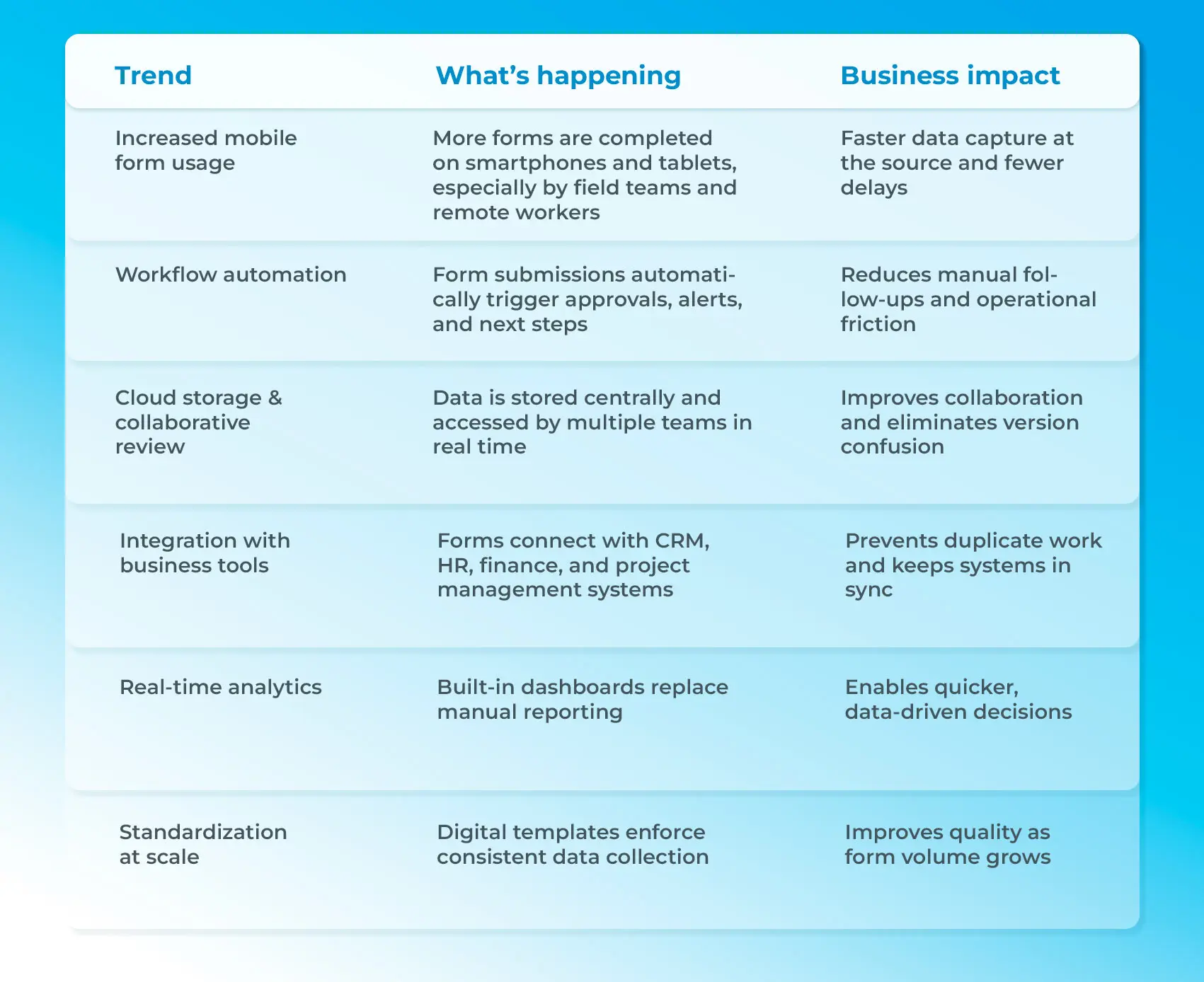
Current trends in why businesses are choosing digital forms
Across industries, organizations are moving toward digital workflows because the gains are visible and measurable. According to DataScope, around 80% of small and mid-sized businesses now choose digital forms over paper. Faster processing, lower operational effort, and better access to data give businesses a real competitive advantage.
Industry insights from platforms like DataScope show that a majority of companies are actively reducing paper-based processes and replacing them with digital tools that support speed, accuracy, and growth. What started as a convenience has become a strategic move.
What this really comes down to is control and visibility. Digital forms give teams immediate access to data, clearer workflows, and the ability to adapt quickly. Paper simply can’t keep pace with how modern operations run today.
Time to digitize your forms: The smarter way forward
When you look at the digital form vs. paper form debate, the difference comes down to how work actually happens day to day. Paper forms depend on slow, manual steps and leave room for errors, delays, and lost information. They may feel familiar, but they quietly hold teams back.
Digital forms make the process easier. Information is collected instantly, checked automatically, and ready to use the moment it’s submitted. Teams respond faster, data stays organized, and decisions aren’t delayed by paperwork.
Choosing digital forms isn’t about moving away from paper. It’s about creating a faster, more efficient future where workflows stay on track, insights are immediate, and work keeps moving forward.
One form. One change. A faster way to work.

FAQs
How do I create a digital form?
You can create a digital form using an online form builder by choosing a form template, adding your fields, and sharing it via a link or QR code. Most tools also let you collect responses automatically in spreadsheets or dashboards.
What is the difference between a paper form and a digital form?
Paper forms require manual filling, collection, and data entry, which slows everything down. Digital forms capture data instantly, reduce errors, and are easier to share, update, and manage.
What is an example of a digital form?
A simple example is an online event registration form that people fill out on their phone using a link or QR code. Other examples include feedback surveys, job applications, and appointment booking forms.