
Have you ever been to an event or store, seen a QR code, and scanned it without thinking twice? That’s convenience in action. Now imagine using QR codes to collect registrations, feedback, or leads.
That’s what QR code forms do. They turn everyday moments into instant opportunities to gather responses, and businesses often see 3–4x more engagement as a result.
A simple scan opens your form instantly, making it easier for them to take action right away. Creating a QR code form takes just a few minutes, and this blog will help you learn how to create a QR code form easily with a form creator.
What is a QR code form?
A QR code form is an online form accessible by scanning the QR code with a smartphone. Instead of copy-pasting or clicking a link, users can access the form in seconds with a simple scan. This removes extra steps and makes the entire process faster and more convenient.
This ease of access often leads to higher response rates, especially when time and attention are limited.
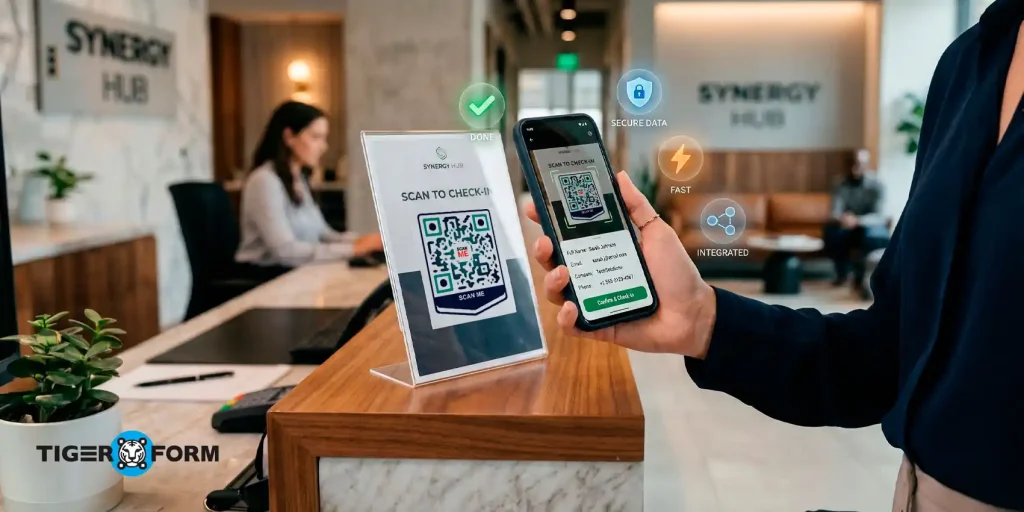
For example, at an event, attendees can scan a QR code at the entrance to open a registration form and check in without waiting in line.
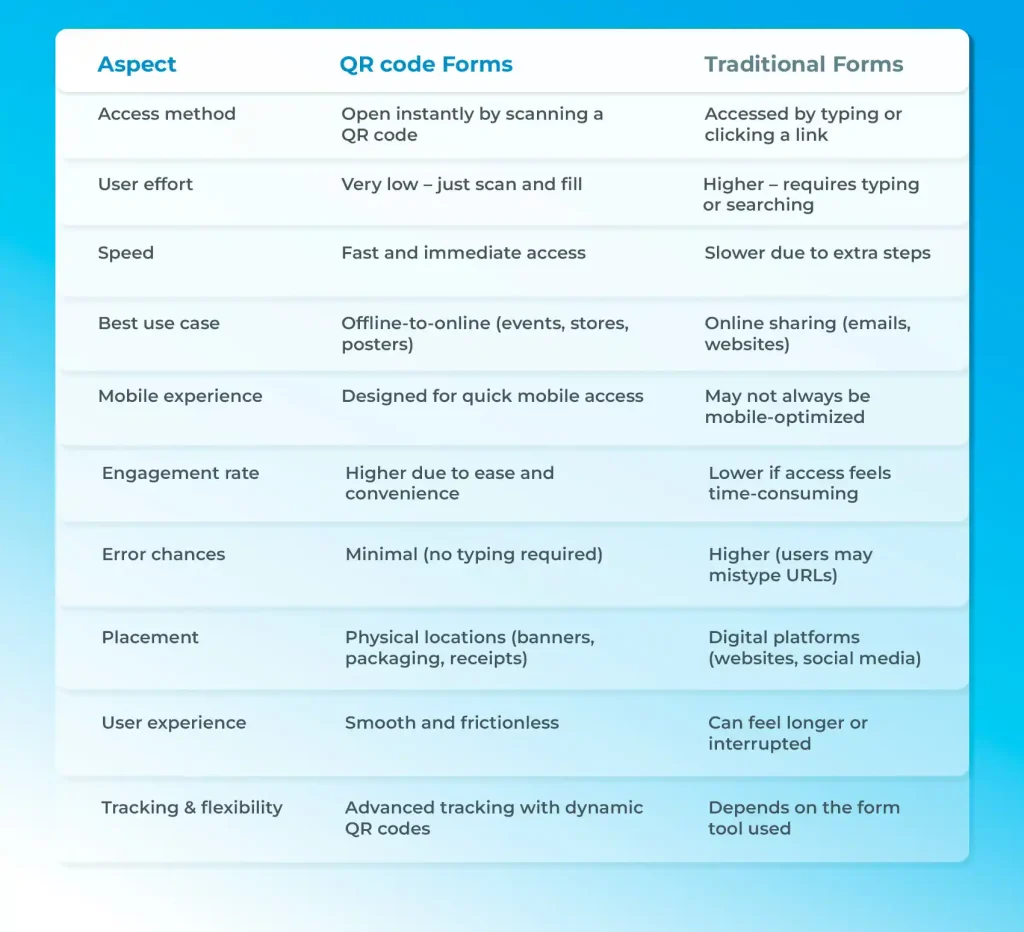
QR code forms vs traditional forms: Which one is better?
How to create a QR code form in minutes with a form builder
Creating a QR code form with a form builder like TIGER FORM is quick and straightforward. Here’s how to create a QR code form in just a few steps:
Start with AI or choose a template
Begin by creating your form. You can either use AI-generated forms or pick a ready-made form template from the form generator. If you choose the AI form generator from TIGER FORM, simply describe your form like “event registration form” or “feedback survey,” and it will generate a complete form for you. If you prefer templates, select one that fits your use case and use it as a starting point.
Customize your form
Edit the form to match your needs. Add or remove fields, update labels, and adjust the layout.
You can include fields like name, email, phone number, or feedback questions. Keep the form simple so users can complete it quickly.
Design your form
Make your form design look clean and professional. You can adjust colors, fonts, and branding elements to align with your business or event.
Generate the QR code
Once your form is ready, use TIGER FORM’s built-in feature to create a QR code.
The form creator automatically links your form to a scannable QR code, no extra tools needed.
Test the QR code
Before sharing, scan the QR code using your phone.
Check if the form opens correctly and works smoothly on mobile devices.
Share your QR code
Now your QR code form is ready to use. Place it on posters, event banners, product packaging, websites, or emails so people can scan and respond instantly.
15 best use cases for QR code forms
QR code forms can be used in almost any situation where you want quick, on-the-spot responses. Because they remove the need to type links, they work especially well in real-world environments where attention is limited.
- Registration forms
Ideal for events, webinars, workshops, or classes. People can scan and register instantly without waiting in line or filling out paperwork.
- Application forms
Useful for job applications, school admissions, or program enrollments. Candidates can access and submit forms directly from their phones, making the process faster and more accessible.
- Feedback forms
Perfect for collecting real-time customer feedback. Businesses can place QR codes on receipts, tables, or counters to encourage immediate responses.
- Survey forms
Great for research, polls, or internal feedback. QR codes make it easy to collect responses in offices, campuses, or public spaces without sharing links.
- Order forms
Restaurants, cafes, and small businesses can allow customers to place orders by scanning a code, creating a smooth and contactless experience.
- Lead generation forms
At trade shows, stores, or marketing campaigns, QR codes help capture customer details instantly and turn interest into actionable leads.
- Quiz forms
Useful for education, training sessions, or engagement campaigns. Participants can scan and start quizzes immediately, making the experience interactive.
- Contact forms
Businesses can place QR codes on business cards, posters, or websites so people can quickly reach out without searching for contact pages.
- Appointment booking forms
Clinics, salons, or service providers can use QR codes to let customers schedule appointments in just a few taps.
- Event check-In forms
Instead of manual check-ins, attendees can scan a QR code on arrival to confirm their presence quickly and efficiently.
- Donation forms
Nonprofits and charities can use QR codes on posters or campaigns to allow people to contribute instantly, increasing participation.
- Membership sign-up forms
Gyms, clubs, or communities can simplify sign-ups by creating a QR code membership form, so that users can scan and join immediately.
- Product registration forms
Brands can include QR codes on packaging so customers can register products or activate warranties without visiting a website.
- Contest and giveaway forms
Perfect for marketing campaigns. Users can scan a QR code to enter contests or giveaways, boosting engagement.
- Training and evaluation forms
Organizations can collect feedback after training sessions or workshops by sharing a QR code for quick evaluation.
Tips to make your QR code forms more effective
Creating a QR code form is easy. Making sure people actually scan it and complete it, that’s where strategy matters. The difference between a form that gets ignored and one that performs well often comes down to small, practical decisions backed by real data.
1. Keep our form short and focused
According to a survey by Forrester, most traditional surveys already struggle with 10–20% response rates, and a big reason is that they feel time-consuming.
QR code forms work better because they’re quick, but that advantage disappears if your form is too long. The best-performing QR code forms are often completed in 15–30 seconds, which keeps users engaged until the end. Ask only what’s necessary. Every extra field increases drop-off.
2. Use a clear and specific Call-to-Action (CTA)
People don’t scan QR codes just because they exist, they scan when they understand the value. A simple line like “Give Feedback in 10 Seconds” or “Register Instantly” can make a big difference.
Even in marketing tests, QR codes with low-effort actions (like sign-ups or feedback) see much higher scan rates than those asking for bigger commitments.
3. Place QR codes at the right moment
Timing matters more than you think. QR code forms perform best when users can respond immediately after an experience.
For example:
- Right after a purchase
- At an event entrance
- On a restaurant table
4. Make it mobile-first (not just mobile-friendly)
Most QR code scans happen on smartphones, so your form must feel effortless on a small screen. According to a Bitly survey, 79% of consumers say they are more likely to purchase products when a scannable QR code provides the information they need on their smartphone. This shows how comfortable people are with scanning and interacting through mobile devices and why your form experience needs to match that expectation.
When forms are optimized for mobile, completion rates improve significantly. According to Opiniator, QR-based surveys can achieve 70–80% completion rates, much higher than many traditional formats.
Use:
- Large input fields
- Minimal typing
- Clean layouts
5. Optimize QR code size and visibility
A QR code that’s too small or poorly placed simply won’t get scanned. It sounds obvious, but it’s one of the most common mistakes.
Real-world campaigns show that visibility alone can dramatically improve engagement. In some cases, adding QR codes to receipts or physical touchpoints has more than tripled response volume.
Make sure your code is:
- Easy to spot
- Large enough to scan from a distance
- Placed at eye level when possible
6. Reduce friction as much as possible
QR codes work because they remove effort. The moment you add friction, performance drops. A Supercode study found that 78% of consumers are willing to provide feedback when the process is quick and easy.
To keep friction low:
- Avoid login requirements
- Skip unnecessary steps
- Don’t redirect multiple times
7. Offer incentives when needed
Sometimes people need a small push. Discounts, coupons, or giveaway entries can significantly increase participation. And there’s a reason this works. Pair ease with a small reward, and response rates often improve further.
8. Track performance and improve over time
One of the biggest advantages of QR code forms is that you can measure everything scans, submissions, and drop-offs.
Businesses using QR codes strategically report 30% higher response rates compared to traditional methods.
But that only happens when you track what’s working and refine it.
Test things like:
- Different placements
- Shorter vs longer forms
- CTA wording

Turn every scan into instant responses with QR code forms today
Getting started with QR code forms is actually simple. You create a form, generate a QR code, and start collecting responses almost instantly.
What makes them so effective is how naturally they fit into real-life situations. There’s no delay, no extra effort, and no need to remember a link later. That’s what drives higher engagement and better results.
If you’re just starting out, begin with a simple use case, like a registration or feedback form. Keep it short, make it mobile-friendly, and place your QR code where people can easily see and scan it. The key is to start. Once you know how to create a QR code form rest is simple. People respond to a simple scan, it becomes clear why QR code forms are becoming a go-to solution for faster, smarter data collection.
FAQs
1. What is the easiest way to create a QR code form?
The easiest way is to use a form builder that includes a QR code generator. Tools with AI form generation and ready-made form templates let you create a form in minutes. After customizing your form, you can generate a QR code instantly without using any third-party tools.
2. Can I track responses from a QR code form?
Yes, you can track responses from a QR code form. Most modern form builders provide analytics such as the number of submissions, response data, and completion rates. If you use dynamic QR codes, you can also track scans, locations, and user behavior.
3. Where can I use QR code forms?
QR code forms can be used in many scenarios, including event registrations, customer feedback, surveys, lead generation, product registration, and contactless ordering. They work especially well in places like events, stores, restaurants, offices, and public spaces where quick access is important.